
A professionally installed home network eliminates these headaches reliably. This guide covers the signs you need an upgrade, what professional installation actually involves, wired versus wireless tradeoffs, security essentials, and how to choose the right Sonoma County provider.
TLDR:
- Persistent dead zones, dropped calls, and device connectivity issues signal infrastructure problems—not simple fixes
- Professional installation includes site assessment, strategic cabling, proper router/AP placement, and documented handoff
- Hybrid setups (wired backbone + wireless access points) deliver superior performance for most homes
- Network security requires WPA3 encryption, guest network segmentation, and ongoing firmware updates
- APCS has served Sonoma County for 25+ years with concierge-style residential network solutions
Signs Your Home Network Needs a Professional Upgrade
When Consumer Wi-Fi Breaks Down
Consumer-grade routers are buckling under modern demands. 78% of U.S. adults report their activities are affected by Wi-Fi performance, and nearly half experience streaming issues due to poor home Wi-Fi. The impact on satisfaction is severe: Wi-Fi dead spots reduce Net Promoter Scores by 17 points on average.
Common symptoms that signal an outdated or poorly configured network:
- Your internet plan delivers 500 Mbps, but devices in bedrooms crawl at 20 Mbps
- Video calls drop or stutter when other devices connect to the same network
- Performance tanks the moment multiple family members are online simultaneously
- You're restarting your router weekly — or daily — just to keep things working
These issues are particularly common in larger Sonoma County properties with thick walls, multi-story layouts, or sprawling floor plans where a single consumer router simply can't provide adequate coverage. If any of these feel familiar, it's a sign the network itself needs attention — not just a reboot.
The Remote Work Reality
The shift to remote work has permanently altered home bandwidth requirements. 75% of workers with jobs that can be done from home are working remotely at least some of the time, and remote work rates more than doubled from 5.7% in 2019 to 13.8% in 2023.
Home offices demand enterprise-grade reliability:
- Video conferencing freezes or drops when the connection isn't stable and low-latency
- Cloud file sharing stalls without consistent upload speeds for real-time collaboration
- VoIP calls break up or fail entirely when the network can't handle the load
- VPN connections require reliable bandwidth — consumer routers often can't deliver it
Consumer-grade setups designed for casual browsing can't reliably deliver these requirements, especially when other household members stream video, game online, or use smart devices simultaneously.
The 21-Device Household
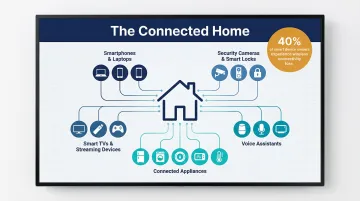
The sheer volume of connected devices is overwhelming legacy routers. U.S. households now average 21 connected devices covering 13 device categories. That covers everything from smartphones and laptops to security cameras, smart locks, voice assistants, and connected appliances.
Older routers were never built to manage that many simultaneous connections. With 40% of smart device owners reporting wireless connectivity loss as a common technical issue, a single router in a busy household is simply outmatched. A properly designed, multi-access-point network is the only reliable fix.
What a Professional Home Network Installation Actually Involves
Starting with a Comprehensive Site Assessment
Professional installation begins with a site assessment, not a quick router swap. A technician evaluates:
- Square footage, floor count, and wall materials — drywall, plaster, concrete, and features like metal roofing all affect signal
- Existing infrastructure: router placement, electrical outlet locations, and usable conduit paths
- Household usage: device count, remote work needs, streaming habits, and smart home plans
- Coverage targets: main house, outdoor patios, detached offices, and guesthouses
This assessment shapes every subsequent decision about cabling, hardware, and placement strategy.
Cabling Standards and Infrastructure Planning
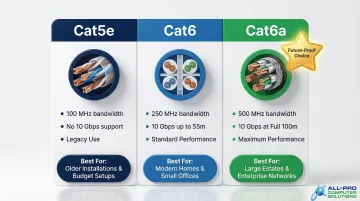
Cabling decisions follow ANSI/TIA-568.2-D standards and depend directly on performance requirements. Understanding these specs helps clarify what your home actually needs:
| Cable Type | Max Frequency | 10 Gbps Distance | Best Use Case |
|---|---|---|---|
| Cat5e | 100 MHz | Not supported | Legacy retrofits, basic gigabit needs |
| Cat6 | 250 MHz | Up to 55 meters | Standard homes, short 10GbE runs |
| Cat6a | 500 MHz | 100 meters | Large estates, future-proofing |
For most single-family homes, Cat6 delivers excellent performance. Larger Sonoma County properties benefit from Cat6a, which guarantees 10 Gbps across the full 100-meter channel. This matters when connecting detached structures or covering sprawling layouts.
Proper cable runs also avoid electrical interference, maintain bend radii to prevent signal degradation, and minimize disruption to finished walls. Where physical cabling work is needed, APCS coordinates with licensed cabling contractors to ensure everything meets spec before network configuration begins.
Strategic Router and Access Point Placement
Unlike dropping a single router in one corner of your home, professional installers position hardware strategically. Key considerations include:
- Ceiling-mounted access points deliver the best coverage and highest line-of-sight probability
- Drywall reduces signal by roughly 1dB; concrete can cause 29–55dB of loss depending on frequency and reinforcement
- Overlapping coverage zones ensure seamless roaming without dead spots
- Centralized switch placement minimizes cable run distances and simplifies future expansion
APCS selects hardware matched to each home's layout — from routers and managed switches to mesh Wi-Fi systems built for properties with multiple buildings or challenging architecture.
Why Mesh Networks Work for Larger Sonoma County Properties
For sprawling Sonoma County properties, wine country estates, or homes with challenging architectural features, mesh Wi-Fi systems often provide the right solution. Mesh networks use multiple interconnected nodes to create seamless coverage, but proper configuration requires technical knowledge:
- Channel selection to avoid interference between nodes
- Band steering to push devices to optimal frequencies
- Backhaul optimization using wired connections between nodes whenever possible
- SSID management to enable seamless roaming across the property
Improper mesh setup creates network conflicts, reduces performance, and introduces additional dead zones rather than eliminating them. Getting configuration right from the start is what separates a working mesh system from a frustrating one.
Testing, Documentation, and Handoff
Professional installation concludes with thorough verification:
- Speed and reliability testing at every endpoint
- Infrastructure labeling for every connection point
- Full network documentation covering router settings, passwords, device assignments, and configuration details
APCS provides clients with an IT binder containing all critical network information, accessible when needed. This documentation proves invaluable when troubleshooting issues, adding devices, or working with other service providers.
Wired vs. Wireless: Choosing the Right Setup for Your Sonoma County Home
The Core Tradeoff
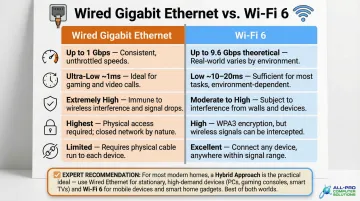
Wired Ethernet delivers superior speed, stability, and security—ideal for home offices, gaming setups, streaming hubs, and any device that stays in one place. Wireless offers convenience and flexibility for mobile devices throughout the home.
| Feature | Gigabit Ethernet (Wired) | Wi-Fi 6 (802.11ax) |
|---|---|---|
| Throughput | Consistent 1 Gbps line rate | Real-world speeds typically 500-1,000 Mbps depending on conditions |
| Latency | Sub-millisecond response times | Improved over Wi-Fi 5 but subject to airtime contention |
| Reliability | Immune to RF interference | Susceptible to physical attenuation and co-channel interference |
| Security | Requires physical cable access | Requires strong WPA3 encryption and segmentation |
| Flexibility | Fixed locations, requires cabling | Excellent mobility for smartphones, tablets, IoT devices |
The Hybrid Approach
For most homes, a hybrid setup delivers the practical best solution: hardwire stationary devices (desktop computers, smart TVs, gaming consoles, NAS drives) and use strategically placed wireless access points to deliver strong Wi-Fi everywhere else.
This approach reserves wired bandwidth for devices that benefit most from guaranteed performance while preserving wireless spectrum for mobile devices and smart home products.
Why Wi-Fi 6 Matters
Wi-Fi 6 (802.11ax) is the current standard worth investing in for new installations. Unlike previous Wi-Fi generations that focused primarily on speed, Wi-Fi 6 was developed to increase both overall efficiency and capacity in device-dense environments.
Key advantages in high-device-count homes:
- Splits available spectrum among devices via OFDMA, reducing delays in congested, device-heavy environments
- Handles more simultaneous connections using MU-MIMO, so devices aren't waiting in line for airtime
- BSS Coloring reduces interference by helping your network distinguish itself from neighboring Wi-Fi signals
- Schedules device communication with Target Wake Time, extending battery life and freeing up network capacity
Sonoma County-Specific Considerations
Rural and semi-rural properties face unique challenges. Larger lots, detached home offices, guesthouses, or barns may require:
- CMX-rated, LLDPE-jacketed cable for direct burial (18-24 inches deep) with UV resistance in outdoor runs
- Surge protectors rated 10kA+ at building entry points to guard against lightning damage
- Point-to-point wireless bridges for outbuildings where trenching isn't practical
These situations benefit from a professional assessment before any work begins. APCS evaluates your property layout, identifies coverage gaps, and recommends the right combination of wired and wireless solutions — then coordinates with appropriate installation contractors where physical cabling is involved.
Home Network Security: Protecting Your Connected Home
Security Starts at Installation
Network security begins with proper configuration—not aftermarket add-ons. A professionally configured network includes:
- Router firewall settings — Blocks unauthorized access while allowing legitimate traffic
- Strong Wi-Fi encryption — WPA3 provides stronger protection than WPA2, including better resistance to password-guessing attacks
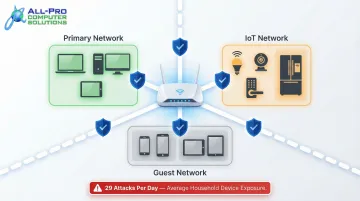
- Guest network segmentation — Keeping IoT devices separate from primary devices to prevent lateral access
- Secure administrative credentials — Strong, unique passwords replacing factory defaults
Consumer routers ship with minimal defaults — most of these settings require manual configuration.
IoT Devices: Your Network's Biggest Vulnerability
An unsecured home network in a connected household creates serious risk. Smart home devices, security cameras, and work laptops all share the same network—a breach in one can expose all others.
The average household faces 29 attacks on connected devices per day. Streaming devices, smart TVs, and IP cameras account for more than half of all vulnerability exploitation attempts detected in smart homes.
Network segmentation addresses this directly: placing IoT devices on a separate VLAN or guest network prevents a compromised smart bulb from opening a path to a remote worker's corporate laptop.
Why Unpatched Routers Are a Standing Invitation
Consumer routers are frequently targeted by threat actors. The CISA Known Exploited Vulnerabilities catalog includes numerous actively exploited flaws in consumer-grade hardware from major brands. Many devices have reached end-of-life and no longer receive security updates.
Ongoing monitoring through APCS's managed services keeps firmware current, applies security patches on schedule, and catches configuration gaps before they become incidents.
Why Sonoma County Homeowners Trust APCS for Home Network Installation
Your Local Network Expert
APCS has served homes across Sonoma County and the North Bay Area for over 25 years. With familiarity with the region's unique property types—from downtown Healdsburg residences to large rural estates—the company has built its reputation entirely on word-of-mouth referrals. Every home network installation is designed around the client's specific needs and budget—no templates, no guesswork.
The Concierge Approach
APCS provides thorough documentation through its signature IT binder, which holds all critical network information and stays accessible whenever you need it. The company offers ongoing support so homeowners are never left troubleshooting alone.
This personalized concierge IT approach ensures you receive:
- Professional network assessment tailored to your property
- Quality equipment installation with mesh Wi-Fi systems covering every room and outbuilding
- Complete documentation of your network setup
- Responsive support when you need it
Ready to Eliminate Your Home Network Headaches?
Readers in Sonoma County—including Windsor, Healdsburg, and surrounding areas—can reach APCS at (707) 400-7100 to schedule a site assessment and get a customized home network plan. The team is available Monday through Friday, 8 AM to 5 PM, with emergency service available on a case-by-case basis.
You can also email apcs.rd@gmail.com or visit the Healdsburg office at 226 University Street, Unit D, Healdsburg, CA 95448.
Frequently Asked Questions
How much does professional home network installation cost in Sonoma County?
Costs vary based on home size, number of cable runs, hardware selected, and setup complexity. Contact APCS at (707) 400-7100 for a customized quote based on your specific property and requirements.
How long does a home network installation typically take?
Most single-family home installations can be completed in a day or less. Larger homes or properties requiring extensive in-wall cabling, outdoor runs to detached structures, or complex mesh configurations may take longer.
Do I need wired Ethernet or will Wi-Fi be enough for my home?
The hybrid approach works best for most households—wired connections for stationary high-demand devices like desktops and smart TVs, wireless for mobile devices. An APCS technician can evaluate your home's layout and usage needs during a site visit and recommend the right mix.
Can you install a home network in a large or rural Sonoma County property?
Yes. Large estates, detached structures, and rural properties may require mesh systems, wireless bridges, or outdoor-rated cabling runs—all of which APCS handles.
Will a new home network installation disrupt my walls or home interior?
APCS technicians minimize disruption by working through existing pathways wherever possible. Cable endpoints are finished cleanly, and the team takes care to preserve your home's appearance throughout the process.
How do I know if my current home network just needs a reboot or a full upgrade?
Persistent issues—dead zones, inability to support multiple devices, slow speeds despite a fast internet plan—typically indicate infrastructure problems, not simple fixes. A professional assessment can clarify whether optimization, hardware replacement, or full infrastructure upgrade is needed.