
Introduction
Most small business owners budget for hardware — routers, switches, a few access points — and stop there. They miss labor, licensing, ongoing management, and the cost of getting it wrong the first time. In 2026, with Wi-Fi 6 now standard and compliance requirements tightening across healthcare, finance, and retail, those overlooked costs add up fast.
Network setup costs range from under $2,000 for a single-room office to over $20,000 for a multi-floor, compliance-grade environment. This guide covers:
- Realistic 2026 pricing tiers by business size
- What drives costs up or down
- A line-item cost breakdown
- The most common budgeting mistakes small businesses make
TLDR
- Typical cost range: $1,500–$3,500 for basic setups; $4,500–$10,000 for small businesses (5–25 users); $12,000–$25,000+ for compliance-heavy environments
- Biggest cost drivers: Number of users and devices, building layout, cabling needs, security requirements, and DIY vs. professional installation
- Who pays less: Teams under 5 users with simple wireless needs and tech-savvy in-house staff
- Higher-cost environments: Healthcare, finance, or retail businesses with HIPAA or PCI-DSS requirements, multi-floor offices, or outdated infrastructure needing a full refresh
- Smart spending: Quality hardware and professional configuration up front cuts costs over 3–5 years in avoided downtime and rework
How Much Does a Small Business Network Setup Cost in 2026?
Network setup costs vary widely based on user count, building size, security requirements, and component quality. Underestimating these variables leads to underbudgeting for cabling, choosing consumer-grade equipment that fails under business load, or facing costly compliance upgrades down the road.
The breakdown below covers three tiers — basic, standard, and advanced — so you can identify where your business fits and plan accordingly.
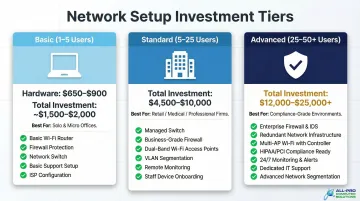
Basic Setup (1–5 Users)
What's Typically Included:
- Business-grade router or firewall combo: $369–$489
- One or two wireless access points: $99–$150 each
- Small unmanaged or lightly managed switch: $50–$80
- Minimal cabling and basic configuration
Current Market Pricing:
- Netgate 2100 Base firewall: $369
- Firewalla Gold SE: $489
- Ubiquiti U6-Lite access point: $99
- Netgear GS108 8-port unmanaged switch: $49.99
Total hardware cost: $650–$900
Best For: Solo practitioners, freelancers, micro-offices, or home-based businesses with basic internet sharing and file access needs. Limited scalability built in.
Once you exceed five users or add VoIP, POS systems, or guest Wi-Fi, the basic tier won't keep up. That's where the standard setup comes in.
Standard Setup (5–25 Users)
What's Typically Included:
- Managed switch with PoE capability
- Dedicated firewall with security subscription
- Two to four business-grade Wi-Fi 6 access points
- Structured Cat6 or Cat6a cabling with professional installation
- Network rack with patch panel and UPS
Current Market Pricing:
- Fortinet FortiGate 60F with 1-year subscription: $962.63
- Cisco Meraki MX67: $628.99 (hardware only, subscription separate)
- Ubiquiti UniFi USW-24-POE switch: $379
- HPE Aruba Instant On AP22: $149.99–$164.99 each
Total installed cost: $4,500–$10,000 (including professional labor and cabling)
Best For: Retail shops, professional service firms, medical offices, and small hospitality venues. This tier supports VoIP, cloud apps, POS systems, and guest Wi-Fi simultaneously.
For businesses operating across multiple departments, floors, or under regulatory requirements, the standard tier leaves meaningful gaps in security and performance.
Advanced Setup (25–50+ Users or Compliance-Grade)
What's Typically Included:
- Next-generation firewall with advanced threat protection
- Six or more enterprise-grade access points
- Managed PoE switches with VLAN segmentation capability
- Full structured cabling across multiple rooms or floors
- Compliance-specific configurations (HIPAA, PCI-DSS)
Current Market Pricing:
- Fortinet FortiGate 100F: $2,398.25 (hardware only)
- Palo Alto Networks PA-450: $3,310
- Ubiquiti U6 Enterprise access point: $279 each
Compliance Cost Add-Ons:
- HIPAA compliance implementation: $5,000–$25,000 for small businesses
- PCI DSS audit costs: $50,000–$150,000
Total installed cost: $12,000–$25,000+
Best For: Growing businesses, multi-department offices, healthcare providers, financial services firms, or any business handling sensitive customer data under regulatory requirements.
Key Factors That Affect Your Network Setup Cost
Network pricing is shaped by technical, physical, and business-specific variables. Knowing which ones apply to your situation helps you budget accurately — without leaving gaps or overspending on capacity you don't need.
Number of Users and Connected Devices
Device count is the single biggest driver of hardware cost. Each additional user typically adds 2–3 devices (laptop, phone, IoT). According to Spiceworks research, 68% of businesses currently use Wi-Fi 6, reflecting the increased device density in modern offices.
More devices require:
- Higher-port-count switches (24-port vs. 8-port)
- Additional access points for wireless coverage
- Firewall with greater throughput capacity to handle simultaneous connections
Building Layout and Cabling Infrastructure
Square footage, ceiling type (drop vs. concrete), number of floors, and whether cabling already exists all affect installation cost. Retrofitting an existing building typically costs 25–40% more than new construction due to wall penetrations, conduit needs, and labor.
Cable runs over 100 meters degrade network performance, so closet placement matters. The ANSI/TIA-568 standard mandates a maximum total channel length of 100 meters for Cat6 and Cat6a.
Internet Speed and Firewall Capacity
Paying for a gigabit internet connection is wasted if your firewall can only process 500 Mbps. Firewall hardware cost scales with throughput requirements. For most small businesses with up to 25 users, a 500 Mbps connection hits the right balance: you're not overpaying on ISP contracts or bottlenecking on hardware.
Security Requirements and Industry Compliance
Businesses handling medical records (HIPAA), payment card data (PCI-DSS), or financial information face additional network costs for proper VLAN segmentation, intrusion detection, encrypted traffic inspection, and documentation. Compliance cost add-ons vary significantly by framework — HIPAA typically adds $5,000–$25,000 in implementation costs, while PCI-DSS audit and certification can run $50,000–$150,000.
Wired vs. Wireless vs. Hybrid Network Design
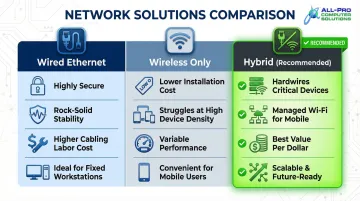
Each design approach carries different cost and performance trade-offs:
- Wired Ethernet drops are more stable and secure, but cabling labor adds up quickly
- Wireless-only setups cost less to install but struggle with high device density and interference
- Hybrid networks hardwire critical devices (printers, POS terminals, servers) while using managed Wi-Fi for mobile devices
For most small businesses, the hybrid approach delivers the most reliable results per dollar spent — which is why it's the default recommendation from most IT professionals.
Complete Cost Breakdown: What You're Actually Paying For
The total investment in a small business network goes well beyond buying a router. Understanding each cost category — both one-time and recurring — keeps your budget realistic from day one.
Hardware (One-Time)
Components:
- Routers/Firewalls: $369–$3,310 depending on throughput capacity and security features
- Managed Switches with PoE: $379–$800+ for 24-port models
- Wireless Access Points: $99–$279 each for business-grade Wi-Fi 6/6E
- UPS (Battery Backup): $150–$400 for systems rated 750VA–1,500VA
Lifespan Note: Enterprise-grade equipment costs more upfront but has a longer lifespan (5–7 years) compared to consumer hardware (2–3 years).
Structured Cabling and Physical Installation (One-Time)
Current 2026 Pricing:
- Cat6 commercial drops: $150–$250 per drop
- Cat6a commercial drops: $200–$350+ per drop
Labor accounts for 60-70% of total installation cost. It's the most underestimated line item — once the walls close up, that work disappears from sight but not from the invoice.
What's included:
- Running cables through walls and ceilings
- Installing patch panels and network racks
- Terminating connections
- Testing and certification
Professional Labor and Configuration (One-Time)
Installation gets the hardware in place. Configuration is where most DIY setups fall short. The median hourly wage for network administrators is $46.54 per hour, while computer network support specialists earn a median of $35.26 per hour.
Typical labor hours for a standard small business setup: 16–40 hours (firewall setup, VLAN creation, security policies, documentation)
Total professional labor cost: $750–$3,500
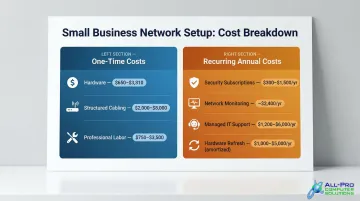
Software Licenses and Security Subscriptions (Recurring Annually)
Current 2026 Pricing:
- Firewall security subscriptions: $300–$1,500 per year depending on features (threat protection, content filtering, intrusion prevention)
- Network monitoring: Paessler PRTG 500 sensors at $200 per month ($2,400 annually)
- Cloud backup: Backblaze B2 at $6 per TB per month or Backblaze Business at $99 per year per computer
Note: A ransomware recovery event can cost small businesses $85,000 or more — many times the annual cost of the subscriptions that prevent it.
Ongoing Managed IT Support and Hardware Refresh (Recurring)
Small businesses without in-house IT staff should budget for either a managed service provider or periodic support contracts. Managed IT services typically cost $100–$250 per user per month, or $50–$100 per device per month.
Hardware refresh cycle: Equipment replacement every 3–5 years adds $1,000–$5,000 to annual operating costs once spread across the replacement cycle.
DIY vs. Professional Network Installation: What's the Real Cost Difference?
DIY Setup Costs:
- Hardware-only cost: $500–$2,500 for basic environments
- Requires significant technical expertise
- No labor costs, but substantial time investment
Professional Installation Costs:
- All-in cost for the same environment: $4,500–$8,000
- Includes expert configuration, testing, and documentation
- Guaranteed performance and warranty coverage
The price gap is significant — but so is the risk gap. DIY setups most often fail at firewall configuration, cable management, and VLAN segmentation, and fixing those mistakes after the fact routinely costs more than hiring a pro upfront.
When DIY Is Appropriate
- 5 or fewer users
- Tech-savvy owner with networking experience
- Basic internet sharing needs
- No compliance requirements
- Single-floor office with simple layout
When Professional Installation Is Essential
- 10+ users
- Compliance requirements (HIPAA, PCI-DSS)
- VoIP phone systems
- POS systems
- Multi-floor offices
- Any environment where downtime directly costs revenue
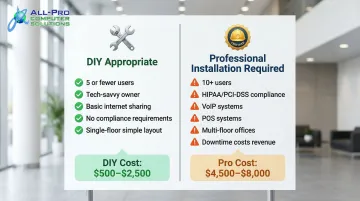
If your situation falls in the second column, a local professional is worth the investment. For North Bay Area businesses, APCS has handled network setups across Sonoma and Marin counties since 1998 — grown entirely by word-of-mouth, with configurations sized to what each business actually needs, not the largest package that fits the budget.
Hidden Network Costs Most Small Businesses Overlook
Focusing Only on Hardware While Ignoring Cabling and Labor
The physical installation—running cables, mounting equipment, terminating connections, and setting up the network closet—often costs as much or more than the hardware itself. Businesses that get hardware-only quotes are routinely surprised when the total bill is double their expectation.
Choosing Internet Speed Without Checking Firewall Throughput
Buying a 1 Gbps internet plan and running it through a $200 firewall is wasted spending. The ISP contract may also lock the business in for 3–5 years. Always match internet speed to firewall capacity before signing an ISP agreement.
Underestimating Ongoing Costs and Ignoring Maintenance
Businesses that don't plan for recurring costs end up with outdated, vulnerable equipment and reactive repair costs. The recurring budget items to plan for include:
- Annual software license renewals
- Hardware refresh cycles every 3–5 years
- Managed IT support or break-fix labor costs
The average cost of IT downtime for a small to medium-sized business is $8,000 per hour. For North Bay businesses that don't have a full-time IT hire, proactive monitoring and managed support through a provider like APCS can prevent that cost from ever appearing on the books.
Over-Specifying Features That Aren't Needed Yet
Don't buy enterprise-tier equipment for a 5-person office—and don't buy consumer-grade gear for a 20-person business either. Both mistakes cost more than getting the right fit from the start.
Conclusion
Network setup costs for small businesses in 2026 range from $1,500 to $25,000+ depending on business size, building conditions, security requirements, and installation approach. Knowing what drives each line item helps you budget accurately — and avoid paying for capacity you don't need or skimping on infrastructure you'll regret later.
The right budget delivers reliable connectivity, proper security, and room to grow — without forcing a costly rebuild two or three years down the road. Before purchasing hardware, a professional site assessment can identify your actual requirements and flag issues like dead zones, insufficient panel space, or security gaps early.
APCS has helped North Bay small businesses plan and implement network infrastructure since 1998. If you're unsure where to start, a brief consultation often saves far more than it costs.
Frequently Asked Questions
How much does it cost to set up a small business network?
Network setup costs range from $1,500 for very basic configurations to $15,000+ for a standard professional setup. The most common range for a 5–25 user business in 2026 falls between $4,500 and $10,000 depending on cabling needs, hardware tier, and whether professional installation is included.
How much does Ethernet/network cabling installation cost?
Professional Cat6 cabling costs $150–$250 per drop; Cat6a runs $200–$350+ per drop in commercial environments. Total project costs for small offices range from $2,000 to $8,000, with ceiling type (concrete vs. drop), number of runs, and building age being the main cost drivers.
How much does it cost to install a wireless (Wi-Fi) network for a business or home office?
Business-grade Wi-Fi 6 access points cost $99–$279 each, with installation adding $150–$300 per access point. A properly segmented wireless network (separate staff, guest, and IoT SSIDs) requires more than just hanging an access point—it requires proper firewall and switch configuration, which adds to the total cost.
What are the ongoing costs to own and maintain a small business network?
Main recurring costs include annual software license renewals ($300–$1,500), managed IT or break-fix support ($1,200–$6,000/year), and hardware replacement cycles every 3–5 years (amortized at $1,000–$5,000 annually). Total annual ongoing costs typically range from $2,500 to $12,000.
Is 500 Mbps enough for a small business?
For most small businesses with up to 25 users doing standard cloud work, video calls, and POS transactions, 500 Mbps is sufficient. Upgrading to 1 Gbps only makes sense if the firewall can handle that throughput—otherwise the extra ISP spend is wasted.
Is VoIP worth it for small businesses?
VoIP phone systems are generally worth it for small businesses—they reduce phone bills, support remote workers, and cut hardware costs versus traditional PBX systems. They do require a properly configured QoS-enabled network to avoid call quality issues, so plan VoIP into your network setup from the start.