
Introduction
Ransomware is involved in 88% of all small and medium-sized business (SMB) breaches, compared to just 39% of attacks targeting larger organizations, according to the 2025 Verizon Data Breach Investigations Report. This disparity shatters the myth that small businesses are "too small to be targeted." In reality, ransomware operators deliberately seek out SMBs precisely because they typically have weaker defenses and limited IT resources.
The operational consequences are real. Small businesses face an average of 24 days of downtime after a ransomware attack, with total costs ranging from $254,445 to over $7 million when accounting for lost productivity, recovery expenses, and reputational damage.
For a small retail shop, medical practice, or restaurant in the North Bay, even a few days offline can mean lost customers, missed payroll, and potentially permanent closure.
This guide addresses both meanings of "SMB ransomware": attacks targeting small and medium businesses, and attacks that exploit the SMB (Server Message Block) file-sharing protocol to spread across networks. What follows covers how each threat works, what attackers look for, and the concrete steps your business can take to stay protected.
TL;DR
- Attackers target small businesses because limited IT budgets and smaller security teams create easier entry points
- The SMB network protocol enables ransomware to spread from one infected device to encrypt shared drives and networked systems
- Effective defense requires multiple layers: employee training, multi-factor authentication, patching, network segmentation, and offline backups
- Regular backup testing, ongoing monitoring, and consistent cyber hygiene are all required—not optional add-ons
- Partnering with a managed IT provider like APCS makes professional-level security tools accessible within a small business budget
Why Small Businesses Are Prime Ransomware Targets
The Low-Hanging Fruit Reality
Small businesses represent nearly four times more frequent targets than large enterprises. Ransomware operators, especially those using Ransomware-as-a-Service (RaaS) platforms, deliberately focus on SMBs because they typically lack:
- Dedicated cybersecurity staff or a Chief Information Security Officer
- Advanced endpoint detection and response (EDR) tools
- Formal incident response plans or cybersecurity insurance
- Regular security training programs for employees
RaaS affiliates can launch high-volume attacks against multiple small businesses simultaneously at minimal cost, treating SMB targeting as a numbers game — more victims, more payouts, less effort per attack.
The Double-Extortion Evolution
Modern ransomware attacks go far beyond simple file encryption. By Q3 2025, 96% of ransomware incidents involved data exfiltration before encryption began. Here's how it works:
- Attackers gain access to your network
- They silently copy sensitive customer data, financial records, or proprietary information
- Only then do they encrypt your systems
- You face two threats: pay to decrypt your files AND pay to prevent public release of stolen data
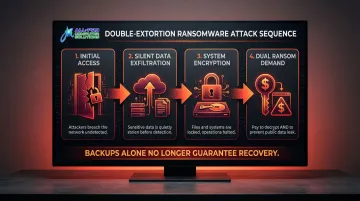
"Just restore from backup" isn't enough anymore. Even if you recover your files, attackers still possess your data and can publish it on dark web leak sites — exposing you to regulatory fines, lawsuits, and serious reputational damage.
Financially-Calibrated Targeting
Ransomware operators deliberately set ransom demands at levels SMBs can realistically pay—often between $115,000 and $325,000—rather than the multi-million-dollar demands issued to Fortune 500 companies. This calculated approach makes payment feel like the only viable option, especially when facing weeks of downtime.
Paying the ransom doesn't guarantee recovery. Victims receive a working decryption tool only 93% of the time, and even then, the average data recovery rate is just 95%. Worse, paying marks your business as a willing victim — raising the likelihood of repeat attacks.
How Ransomware Uses the SMB Protocol to Spread Through Your Network
Understanding the SMB Protocol
Server Message Block (SMB) is the technology that allows computers on your network to share files, printers, and resources. When employees access shared drives to collaborate on documents or update customer records, they're using the SMB protocol. It's built into every Windows business network and runs constantly in the background.
How Attackers Exploit SMB for Lateral Movement
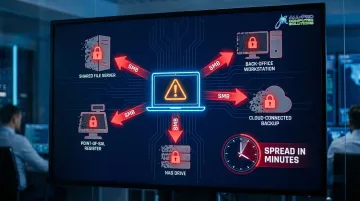
Once attackers gain initial access through phishing, stolen credentials, or an unpatched vulnerability, they weaponize the SMB protocol to move laterally:
- Authenticate using stolen credentials to access network shares
- Discover and map all accessible shared drives, folders, and connected systems
- Deploy ransomware that encrypts files on every connected device via SMB
- Delete or encrypt backups stored on network-accessible locations
The ransomware doesn't need to be installed on each individual machine—it can encrypt files remotely over SMB shares, bypassing endpoint security software entirely.
Historical context: The WannaCry ransomware attack in 2017 exploited the EternalBlue vulnerability (CVE-2017-0144) in SMBv1 to spread worm-like across networks. Microsoft had released a patch two months before the global outbreak, yet over 200,000 computers in 150 countries were infected because organizations failed to apply available updates.
The Unmanaged Device Blind Spot
That lateral movement becomes even more dangerous when you account for devices that never had proper security in the first place. Ransomware frequently originates from:
- An employee's personal laptop connected to the guest Wi-Fi
- An old server still running outdated software
- An unmonitored workstation in a back office
- A smart printer or NAS device with default credentials
Even though your primary workstations may have antivirus and endpoint protection, ransomware from an unmanaged device can access and encrypt files on fully protected machines via SMB shares—bypassing those defenses entirely.
Why This Matters Operationally
In a typical small business where staff share drives for invoices, customer databases, patient records, or inventory systems, a single SMB-based ransomware attack can encrypt the entire organization's working data within minutes. Without tested offline backups, paying the ransom becomes the only option — and even that doesn't guarantee your data comes back intact.
Essential Steps to Protect Your Business from Ransomware
Enforce Multi-Factor Authentication (MFA) Everywhere
Implementing MFA on all accounts—especially email, remote access tools, and cloud services—is the single highest-impact security measure a small business can take. Microsoft reports that MFA blocks over 99.9% of account compromise attacks. Stolen credentials are involved in the majority of SMB breaches, and MFA stops attackers from using those credentials even when compromised.
Additional critical steps:
- Disable unused accounts immediately when employees leave
- Close open Remote Desktop Protocol (RDP) ports to the internet (RDP was abused in 90% of attacks handled by Sophos Incident Response)
- Apply the principle of least privilege—users should only access what they need
- Remove local administrator rights from standard user accounts
Patch Management and Software Updates
Unpatched systems remain a primary entry point for ransomware. Many large-scale attacks, including WannaCry and NotPetya, exploited known vulnerabilities that had patches available for weeks or months before the outbreaks occurred.
Best practices:
- Enable automatic updates for operating systems wherever possible
- Prioritize patching for critical vulnerabilities, especially those affecting SMB protocol (such as CVE-2024-43642 and CVE-2022-35804)
- Establish a monthly patch review process for systems that can't auto-update
- Test patches in a controlled environment before deploying to production systems
Email Security and Phishing Defense
Phishing emails are the number one delivery mechanism for ransomware. The median time for users to fall for phishing emails is less than 60 seconds, and 68% of all breaches involve a non-malicious human element like falling victim to social engineering.
No single tool stops phishing on its own. Effective protection stacks multiple defenses:
- Advanced email filtering that scans incoming messages and attachments for threats
- Sender authentication to flag spoofing attempts
- Link protection that checks URLs before users click
- Attachment sandboxing to detonate suspicious files in isolated environments
APCS provides email security for North Bay small businesses using the same scanning technology that major corporations rely on—covering all emails and attachments at a price point that fits small business budgets.
Backup Strategy—The 3-2-1 Rule
The 3-2-1 backup rule is your last line of defense:
- 3 copies of your data (1 primary + 2 backups)
- 2 different types of media (e.g., local drive and cloud storage)
- 1 copy stored offline or in an immutable (non-overwritable) location
Why offline/immutable backups are critical: 94% of organizations hit by ransomware reported that attackers attempted to compromise their backups, with 57% of those attempts succeeding. Ransomware specifically targets and deletes connected backup systems before triggering encryption.
Test your backups regularly. While 71% of managed SMB clients have automated backups, only 5% have tested a restore within the last 90 days. If you haven't verified a restore recently, you don't actually know whether your backup works.
Network Segmentation
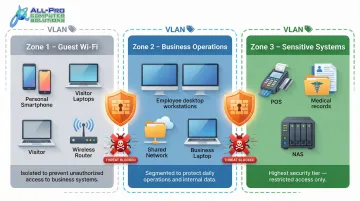
Dividing your business network into isolated segments dramatically limits ransomware's ability to spread laterally:
- Separate guest Wi-Fi from employee devices
- Isolate sensitive systems like point-of-sale terminals or patient records
- Restrict which devices can communicate over SMB shares
- Implement VLANs (Virtual Local Area Networks) to create security boundaries
Proper segmentation ensures that even if one device is compromised, ransomware cannot easily jump to other parts of your network. For businesses with shared drives, this boundary is often the difference between a single infected workstation and a full network shutdown.
Ongoing Security Practices to Maintain Your Defenses
Employee Security Awareness Training
Brief, frequent training sessions are far more effective than a single annual presentation. Monthly phishing refreshers and occasional simulated phishing tests create genuine behavioral change — employees who recognize suspicious emails, unusual login prompts, and social engineering attempts become a real security layer, not just a compliance checkbox.
Enable Network Monitoring and Endpoint Visibility
Monitoring tools detect unusual behavior early enough to contain threats before they spread:
- A device attempting to encrypt large numbers of files rapidly
- Access to network shares the device never normally uses
- Communication with unfamiliar external servers
- Unusual login times or locations
For businesses without in-house IT staff, these capabilities can be provided through a managed IT partner like APCS, which offers continuous monitoring and protection for North Bay businesses.
Maintain Cyber Hygiene as a Routine
Schedule recurring security reviews rather than reacting only when problems arise:
- Remove departed employees from systems immediately
- Review user access permissions quarterly
- Confirm firewall rules haven't drifted from security policies
- Audit all devices connected to your network — personal devices, old servers, and printers often lack security agents and create exploitable blind spots
Common Ransomware Security Mistakes SMBs Make
Most SMBs don't get hit by ransomware because of sophisticated attacks — they get hit because of avoidable mistakes. These are the three most common ones.
Assuming "We're Too Small to Be Targeted"
This is the most dangerous misconception. Financially motivated ransomware operators specifically seek out SMBs because their defenses are weaker and even modest ransom demands are profitable. Acting before an incident occurs is always cheaper than recovering after one — when options are limited and costs multiply fast.
Treating Backups as "Set and Forget"
Many businesses have backup systems that have never been tested — or that back up to drives connected to the same network. According to Acronis's SMB cybersecurity research, a significant share of SMB backups fail during restoration. Ransomware encrypts network-connected backups along with everything else, so an untested backup is often no backup at all.
Required actions:
- Test restore procedures at least quarterly
- Store at least one backup copy completely offline or in an immutable format
- Verify that backup jobs are completing successfully
- Document and practice your recovery process
Skipping MFA and Relying on Passwords Alone
Attackers frequently purchase stolen credentials on dark web marketplaces for as little as $10–$50 per account. They use these credentials to log in over RDP (remote desktop) or VPN without any barrier. A valid-looking login grants full access to encrypt files across every SMB share the account can reach. Enabling MFA on every remote access point stops these credential-stuffing attempts cold — even when a password has already been compromised.
What to Do If Ransomware Hits Your Business
Isolate Affected Systems Immediately
Disconnect infected devices from the network to stop ransomware from spreading via SMB shares:
- Unplug ethernet cables and disable Wi-Fi
- Do not turn off machines entirely—forensic evidence may be preserved in memory
- Document which systems appear affected
- Prevent users from accessing shared drives until the threat is contained
Do Not Pay the Ransom Without Expert Guidance
Payment does not guarantee decryption and may not recover all data if double-extortion data theft has already occurred. Beyond the data risk, paying flags your business as a willing target — increasing the odds of follow-on attacks. Law enforcement agencies recommend reporting ransomware incidents to the FBI's IC3 or CISA before making any payment decision.
Contact your IT provider or a cybersecurity incident response professional as your first call, not the attacker.
Initiate Recovery from Clean, Offline Backups
Once the network is secured and your team identifies and closes the infection vector, restore systems from the most recent verified offline backup. Recovery time depends on backup freshness and whether you have a tested incident response plan.
Businesses with tested plans recover in hours. Those without one can face weeks of downtime. APCS works with North Bay businesses on both sides of this: setting up secure, offline backups before an attack and providing hands-on recovery support when one happens.
Conclusion
Ransomware protection for small businesses depends on layering practical, high-impact defenses—MFA, patching, email security, offline backups, network segmentation, and employee awareness—rather than relying on any single tool or one-time action. Each layer closes gaps the others cannot cover, creating a defense-in-depth strategy that makes your business a hard target.
North Bay small business owners should treat cybersecurity as an ongoing operational discipline, not an IT afterthought. Keeping that discipline consistent is where most small businesses struggle — and where a dedicated local IT partner makes the difference. APCS has delivered concierge-style IT security services to North Bay businesses for over 25 years, helping organizations in Sonoma, Marin, and Mendocino counties build the same layered defenses described in this guide — on a small business budget, without the complexity.
Frequently Asked Questions
Frequently Asked Questions
Is the SMB protocol secure?
The SMB protocol itself is not inherently insecure, but it is frequently exploited by ransomware because it provides access to shared network resources. Disabling SMBv1 (an older, vulnerable version), patching systems regularly, requiring authentication, and segmenting your network significantly reduces SMB-related risk.
How can I protect my NAS from ransomware?
Keep NAS firmware updated, disable SMBv1, and restrict access to specific users and devices. Enable versioning or snapshots for file recovery, and maintain at least one offline or air-gapped backup that ransomware cannot reach even if the NAS is compromised.
What is the 3-2-1 rule for ransomware?
Keep 3 copies of data, stored on 2 different types of media such as a local drive and cloud storage, with 1 copy stored offline or in an immutable format that ransomware cannot overwrite. The offline copy is critical because ransomware routinely targets and destroys connected backups before encryption.
What should a small business do immediately after a ransomware attack?
Isolate affected systems from the network immediately to stop lateral spread. Contact an IT professional or incident response specialist before paying ransom or making recovery decisions, then restore from offline backups once the environment is secured.
How does ransomware spread through a business network?
Ransomware typically enters through phishing, stolen credentials, or an unpatched vulnerability, then uses the SMB protocol to authenticate to network shares and encrypt files across every reachable device. Network segmentation and MFA are critical for stopping that lateral spread.
Can paying the ransom guarantee my data will be recovered?
No. Paying does not guarantee decryption — attackers often provide broken or partial tools. If data was exfiltrated before encryption (double extortion), payment also won't prevent it from being published. Tested offline backups remain the most reliable path to recovery.