Mac & PC Repair
Fast, reliable Mac repair services addressing hardware and software issues, including peripheral malfunctions. We diagnose problems, offer solutions, and use quality parts to restore your device to peak performance.

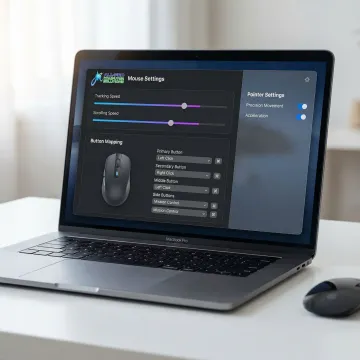
Getting the most out of your Mac starts with a mouse that responds exactly the way you want it to. From tracking speed and scroll behavior to button mapping and pointer precision, APCS helps you configure, troubleshoot, and optimize every mouse setting—so your device works seamlessly with your workflow, whether at home or in a North Bay business.
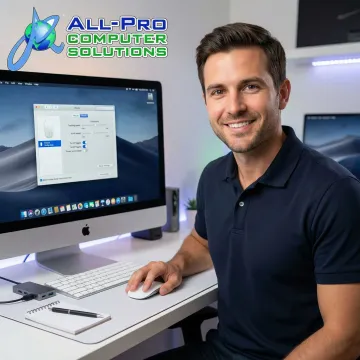
From software setup to peripheral troubleshooting, we handle every aspect of Mac mouse configuration for home and business users.
Fast, reliable Mac repair services addressing hardware and software issues, including peripheral malfunctions. We diagnose problems, offer solutions, and use quality parts to restore your device to peak performance.
Professional installation and configuration of Mac mouse software and third-party tools, with full compatibility checks and updates to ensure smooth, secure operation across all your Apple devices.
Expert troubleshooting and resolution for wired and wireless Mac input devices, including mice and keyboards, restoring reliable connectivity and responsive performance to your workstation.
Ongoing IT support covering routine Mac device configuration, software updates, and user assistance—keeping your mouse settings and peripherals performing flawlessly without interruption.
Personalized Mac configuration services tailored to your exact needs and budget. We learn your workflow, then customize every setting—including mouse behavior and software tools—for maximum productivity.
Full-service Mac support for home users, including mouse configuration, peripheral setup, and complete home network optimization across all Apple devices in your household.
Mac users in Sonoma County and throughout the North Bay Area deserve peripherals that work exactly as intended. APCS configures tracking speed, scrolling behavior, button mapping, and pointer precision using the right software tools for your specific Mac model and macOS version. Whether you're a home user frustrated by default settings or a business user needing a consistent setup across multiple machines, our personalized concierge approach ensures your mouse configuration is dialed in, documented, and easy to maintain.
See how North Bay homes and businesses improved their Mac experience with APCS.
"I have been a Mac user since day 1. Richard gave me simple tips no one else has that helped my computer run faster. Richard knows his stuff thank you for your support! I have recommended Richard to friends and clients."

"Absolutely fantastic service! My phone's screen was cracked, and GadgetFix had it fixed in no time. The repair was flawless, and the customer service was top-notch. Highly recommend!"

"I have been a Mac user since day 1. Richard gave me simple tips no one else has that helped my computer run faster. Richard knows his stuff thank you for your support! I have recommended Richard to friends and clients."
"Absolutely fantastic service! My phone's screen was cracked, and GadgetFix had it fixed in no time. The repair was flawless, and the customer service was top-notch. Highly recommend!"
"I have been a Mac user since day 1. Richard gave me simple tips no one else has that helped my computer run faster. Richard knows his stuff thank you for your support! I have recommended Richard to friends and clients."
"Absolutely fantastic service! My phone's screen was cracked, and GadgetFix had it fixed in no time. The repair was flawless, and the customer service was top-notch. Highly recommend!"
We combine over 25 years of hands-on Mac expertise with a personalized approach that bigger IT companies simply can't match.
Serving North Bay homes and businesses since 1998, we understand macOS inside and out—including every peripheral configuration challenge.
We don't apply one-size-fits-all settings. Every Mac mouse configuration is customized to your exact workflow, software, and preferences.
Our entire growth across Sonoma and Marin Counties has been driven by client referrals—a direct reflection of the quality and trust we deliver.
With one of the fastest response times in the North Bay Area, we resolve your Mac peripheral issues quickly so your workflow stays uninterrupted.
Skilled technicians dedicated to keeping your Mac running perfectly.
Technician
Richard is a cornerstone of the All Pro Computer Solutions team, bringing deep hands-on expertise in Mac and PC hardware, software configuration, and peripheral setup to every client interaction. Whether it's configuring mouse tracking software on macOS, recovering critical data from a failing drive, or building a specialized computer for a North Bay business, Richard approaches every task with precision and care. He's widely known for translating complex technical challenges into simple, practical solutions—helping clients keep their machines running faster and more reliably. Recommended repeatedly by satisfied clients throughout Sonoma and Marin Counties, Richard exemplifies the APCS commitment to personalized, concierge-level IT service that genuinely improves daily life and productivity.
macOS includes built-in mouse settings under System Settings > Mouse, where you can adjust tracking speed, scrolling direction, and secondary click behavior. For advanced customization—such as custom button mapping, gesture controls, and per-app settings—third-party tools like SteerMouse, BetterTouchTool, or Logitech Options+ (for Logitech mice) offer significantly more control. APCS can recommend and install the right tool for your specific Mac model and workflow.
Talk to our Mac experts for personalized advice and a free consultation.
APCS serves homes and businesses throughout the North Bay Area, from Marin to Mendocino County.
Hwy. 101 from Marin to Mendocino
Service Corridor
2 Offices
Locations
Mon–Fri, 8–5 PM
Availability
Contact us to confirm coverage and schedule your Mac configuration appointment today.

Serving North Bay clients with excellence since 1998.
Built entirely on client referrals and satisfaction.
Managing nearly 500 computers with proven reliability.
Fill out the form below and an APCS technician will get back to you promptly—Monday through Friday—to schedule your personalized Mac configuration service.
For immediate assistance, feel free to give us a direct call at (415) 900-8928. You can also send us a quick email at apcs.rd@gmail.com
For immediate assistance, feel free to give us a direct call at (415) 900-8928. You can also send us a quick email at apcs.rd@gmail.com