With hundreds of malware removal tools on the market—ranging from free scanners to enterprise-grade security suites—choosing the right one can feel overwhelming. This guide cuts through the noise, reviewing the top options based on real-world protection, ease of use, and value for home users and small businesses in the North Bay Area and beyond.
TL;DR
- Malware includes viruses, ransomware, spyware, trojans, and adware—all designed to damage, disrupt, or steal data
- Top 2026 picks: Bitdefender (best overall), Norton 360 Deluxe (best bundled), Malwarebytes Premium (best proactive), Avast One Essential (best free), and ESET Home Security Essential (best customizable)
- Strong protection requires real-time scanning, on-demand scans, and behavioral detection to catch both known malware and zero-day attacks
- Look for high independent lab detection rates, low system performance impact, cross-platform support, and real-time protection before buying
What Is Malware — and Why Does It Matter in 2026?
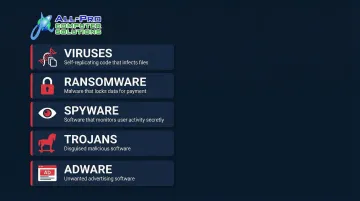
Malware (short for "malicious software") is any program designed to damage, disrupt, or gain unauthorized access to a device or network. The major types include:
- Viruses — Self-replicating programs that spread by infecting other files
- Ransomware — Encrypts your files and demands payment to unlock them
- Spyware — Covertly tracks your activity and steals personal information
- Trojans — Disguised as legitimate programs but hide malicious functions
- Adware — Injects unwanted ads and can lead to phishing attacks
2026 brings heightened risk. AI-powered malware generation is making threats harder to detect with traditional signature-based tools. The average small business breach now costs $3.31 million, and AI has reduced phishing campaign costs by 95%, making attacks more frequent and sophisticated.
Both built-in OS protections (like Windows Defender) and third-party tools have come a long way — but the most reliable defense pairs a trusted security tool with smart online habits.
Best Malware Removal & Protection Software for 2026
These five tools were evaluated based on independent lab test scores (AV-TEST, AV-Comparatives), real-time protection capability, ease of use, platform support, pricing, and track record of frequent updates. Each suits a different use case.
Bitdefender Antivirus Plus
Bitdefender Antivirus Plus consistently ranks among the top antivirus and malware removal tools globally, earning perfect 6.0/6.0/6.0 scores from AV-TEST in February 2026. Available for Windows, macOS, Android, and iOS, it suits both individual users and small businesses managing multiple device types.
What makes it stand out:
Bitdefender's AutoPilot mode minimizes user intervention while providing continuous real-time protection. Key features include:
- Multi-layered ransomware protection with automatic remediation
- Anti-phishing tools and anti-tracker browser extension
- SafePay isolated browser for secure financial transactions
- Limited VPN (capped at 200MB per day per device on entry-tier plans)
- On-access and on-demand scanning with behavioral threat detection
| Feature | Details |
|---|---|
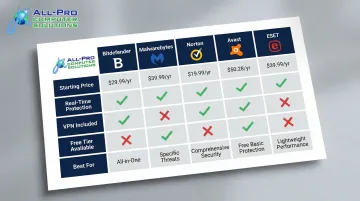
| Starting Price | $29.99/year (first year), renews at $69.99 |
| Best For | Home users and small businesses wanting set-and-forget protection with top lab-verified detection rates |
| Key Features | Real-time + on-demand scanning, ransomware remediation, anti-phishing, anti-tracker, SafePay browser, limited VPN |
Malwarebytes Premium
Malwarebytes began as an emergency cleanup tool but has evolved into a full-featured malware removal and protection suite available on Windows, macOS, Android, and iOS. IT professionals frequently recommend it as a secondary scanner to supplement other tools, and it was named Product of the Year 2025 by AVLab Cybersecurity Foundation.
Why it works:
Malwarebytes excels at proactive, behavior-based threat detection — blocking trojans, botnets, ransomware, exploit attacks, and potentially unwanted programs (PUPs) before they cause damage. The platform achieved 100% blocking of in-the-wild malware with an average remediation time of just 17.1 seconds.
Its Browser Guard extension adds protection in Chrome, Firefox, Safari, and Edge. The free tier supports on-demand scanning only; paid plans unlock real-time protection and scheduled scans.
| Feature | Details |
|---|---|
| Starting Price | Free tier available; Premium starts at $44.99/year per device |
| Best For | Users wanting proactive real-time protection with a proven browser security layer; also a reliable secondary scanner |
| Key Features | Real-time + on-demand scanning, Browser Guard extension, ransomware and exploit protection, multi-platform support |
Norton 360 Deluxe
Norton is one of the most recognized names in cybersecurity with decades of industry history. Norton 360 Deluxe is a comprehensive security suite that goes well beyond malware removal, offering cross-platform protection for Windows, macOS, Android, and iOS with coverage for up to five devices on standard plans.
Where it excels:
Norton earns perfect 6.0/6.0/6.0 scores from AV-TEST and blocked 100% of threats in AV-Comparatives' Real-World Protection Test (July-October 2025) — a rare distinction among all tested products. Key features include:
- No-limits VPN (unlike many competitors whose VPNs are capped at entry tiers)
- 50GB of cloud backup for important files
- Norton Family parental controls
- Smart firewall and dark web monitoring
- Password manager
- 100% Virus Protection Promise backed by expert remote support
| Feature | Details |
|---|---|
| Starting Price | $119.99/year (first year, up to 5 devices) |
| Best For | Multi-device households, families, and small businesses wanting an all-in-one suite with full VPN and cloud backup |
| Key Features | Real-time protection, no-limits VPN, 50GB cloud backup, dark web monitoring, parental controls, smart firewall |
Avast One Essential
Avast reaches hundreds of millions of users worldwide, and its free tier — Avast One Essential — delivers a robust suite of malware protection features at no cost for Windows and macOS users. It earned perfect 6.0/6.0/6.0 scores from AV-TEST in February 2026 and blocked 100% of threats in AV-Comparatives' Real-World Protection Test.
What sets it apart:
The free version includes features that many paid tools charge for:
- On-access, scheduled, and on-demand scanning
- Ransomware protection
- Basic firewall
- Network Inspector to detect vulnerabilities
- Scam guidance to avoid phishing attempts
- Free VPN limited to 5GB per week
Premium upgrades unlock Wi-Fi security checks and unlimited VPN access. Avast also ranked among the lowest-impact tools in AV-Comparatives' September 2025 Performance Test, meaning it won't slow down your system.
| Feature | Details |
|---|---|
| Starting Price | Free tier available; Avast One Silver starts at approximately $79.99/year |
| Best For | Budget-conscious users or first-time security software users wanting solid coverage at no cost |
| Key Features | On-access and on-demand scanning, ransomware protection, basic firewall, network inspector, scam guidance, limited VPN |
ESET Home Security Essential
ESET is a long-established cybersecurity company known for deep technical capability and high independent lab scores. Its Home Security Essential suite (formerly ESET Internet Security on Windows and ESET Cyber Security on macOS) is built for users who want granular control over their security layers.
ESET was named AV-Comparatives' Product of the Year for 2024 and achieved perfect 6.0/6.0/6.0 in AV-TEST's February 2026 evaluation.
Notable capabilities:
ESET offers highly customizable scan configurations, including:
- Real-time protection with financial transaction safeguarding
- Anti-phishing and anti-spam tools
- Advanced firewall with detailed rule configuration
- Customizable on-access and on-demand scanning
- Free ESET Online Scanner for one-time malware checks (even outside trial periods)
ESET is best suited for technically inclined users willing to invest time in configuration — it rewards that effort with some of the most precise scan customization available.
| Feature | Details |
|---|---|
| Starting Price | $49.99/year for one device (Home Security Essential) |
| Best For | Tech-savvy users, IT professionals, and small business owners wanting precise, customizable scan settings and deep security control |
| Key Features | Customizable on-access and on-demand scanning, real-time protection (including financial transactions), anti-phishing, firewall, anti-spam |
How We Chose the Best Malware Removal Software
The selection process mirrors how IT professionals evaluate security tools. Each product was assessed across six criteria drawn from independent lab data (AV-TEST, AV-Comparatives) and real-world testing:
- Detection rates from third-party lab results
- Real-time versus on-demand protection capabilities
- System performance impact during active scans
- Platform compatibility across Windows, Mac, and mobile
- Pricing transparency and value across tiers
- Frequency of signature database updates
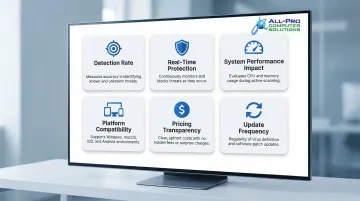
One common mistake: Users choose based on price alone or rely on marketing claims without checking independent lab results.
Key Criteria and Why They Matter
Detection Rate: Tools like Norton and Avast achieved 100% blocking in real-world tests, while others hovered around 99.1%. That difference matters most when a new ransomware variant hits before signatures are updated.
Behavioral Detection: Traditional signature-based scanners only catch known malware. Modern tools like Malwarebytes identify suspicious activity patterns, blocking new threats that don't yet have a signature on record.
Ease of Use: Bitdefender's AutoPilot mode and Avast's streamlined interface keep protection running without requiring constant user decisions. ESET's advanced customization is powerful but can overwhelm non-technical users.
Scalability: Norton 360 Deluxe covers up to 5 devices, making it practical for families or small teams. Single-device plans work for individuals but get expensive quickly when protecting a full office.
Real-Time Protection: Free tools often lack real-time scanning, which is critical for catching active threats. Avast One Essential is a notable exception — it provides real-time shields at no cost.
APCS Context
These criteria aren't just theoretical — they reflect what APCS technicians have applied across real client environments in the North Bay Area for over 25 years. The recommendations in this guide are based on what actually works in homes and small businesses, not just what scores well in a controlled benchmark.
If you're unsure which solution fits your specific needs or suspect your devices may already be compromised, APCS's experienced technicians can help assess your setup and recommend the right protection for your situation.
Conclusion
Choosing malware protection comes down to your situation. A home user with one laptop has very different needs than a small business managing 15 workstations. The tools reviewed here—Bitdefender, Malwarebytes, Norton, Avast, and ESET—each cover a distinct use case: overall protection, proactive defense, bundled security, free coverage, and advanced customization.
Before deciding, match your setup—number of devices, OS, budget, and comfort level—against the selection guide above. Here's a quick starting point:
- Most users: Bitdefender or Norton for the strongest all-around protection
- Budget-conscious: Avast One Essential as a solid free starting point
- Tech-savvy users: ESET for granular control and deep customization
If you're a home user or small business in the North Bay Area and you're unsure which solution fits your setup—or you suspect your devices are already compromised—APCS can help. From security assessments to malware removal and ongoing IT support, call (707) 400-7100 or (415) 900-8928 to get started.
Frequently Asked Questions
What are the best computer virus removal services?
The best solution depends on whether the device is already infected or needs ongoing prevention. For emergency cleanup, use on-demand tools like Malwarebytes Free or Emsisoft Emergency Kit. For continuous protection, full-suite services like Bitdefender or Norton provide real-time scanning and automatic threat removal.
What is the difference between antivirus and anti-malware software?
"Antivirus" and "anti-malware" are largely used interchangeably today. Modern antivirus tools protect against all malware types—ransomware, spyware, trojans, adware—not just traditional viruses. The term "antivirus" is a legacy label from when viruses were the primary threat.
Do I need to pay for malware removal software, or are free options enough?
Free tools like Avast One Essential or Malwarebytes Free provide solid baseline protection, but paid plans typically add real-time scanning, scheduled scans, VPN, and ransomware remediation. For actively used devices—especially those handling sensitive data—paid plans are worthwhile.
How do I know if my computer has malware?
Common symptoms include unexpected slowdowns, unwanted pop-ups, unknown programs running in the background, sudden storage loss, and browser redirects. If you notice these signs, run a full scan with a trusted malware tool immediately.
Can malware removal software protect me in real-time?
Real-time protection depends on the plan. Free tiers like Malwarebytes Free often only include on-demand scanning, while paid plans from Bitdefender, Norton, and Malwarebytes include continuous background monitoring that blocks threats as they appear.
Is Windows Defender enough to protect my computer?
Windows Defender has improved and offers reasonable baseline protection, but independent lab tests show Defender blocking 99.1% of threats—trailing Norton and Avast (100%). Third-party tools also add more frequent updates, ransomware remediation, and phishing protection.