
This guide cuts through that noise. Laptop repair costs vary widely based on the type of failure, your laptop's brand and age, local labor rates, and whether parts need replacing. Below, you'll find real 2026 pricing ranges for the most common repairs, the factors that drive costs up or down, and the decision framework that helps you choose repair over replacement—or vice versa—with confidence.
TL;DR
- Most laptop repairs fall between $75 and $300, with software fixes on the low end and hardware replacements or data recovery on the high end
- Repair type, laptop brand (Mac vs. PC), and whether you choose on-site or drop-off service drive most of the price variation
- Mac repairs typically cost more than equivalent PC repairs due to proprietary parts and higher labor requirements
- When repair costs top 50% of your laptop's current value, replacement is the smarter financial move
How Much Does Laptop Repair Cost? Pricing Overview
There's no single flat price for laptop repair. Costs depend on the problem type, laptop brand and model, parts availability, and local labor rates. Misunderstanding this often leads to sticker shock when a "simple fix" turns out to need a $200 part, or to unnecessary replacements when a $100 repair would have solved the issue.
The two most common budgeting mistakes: assuming all repairs are cheap (leading to surprise when hardware is involved) and assuming all repairs are expensive (leading people to replace a device that only needed a minor fix). Both mistakes cost money and time.
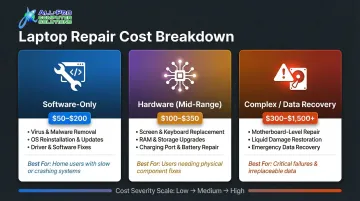
Here's how the three main repair tiers compare:
| Repair Type | Typical Cost | What's Covered | Best For |
|---|---|---|---|
| Software-only | $50–$200 | Virus removal, OS reinstalls, driver fixes, tune-ups | Slow or crashing laptops with intact hardware |
| Hardware (mid-range) | $100–$350 | Screens, batteries, keyboards, fans, drives | Physical damage on laptops under 5–6 years old |
| Complex / Data Recovery | $300–$1,500+ | Motherboards, liquid damage, failed drive recovery | Critical data or newer high-value machines |
Software-Only Repairs
Typical cost range: $50–$200
No parts cost involved—this tier is primarily labor. National averages for laptop repair land around $140, with software services on the lower end of that range.
Best for:
- Slow laptops with no hardware damage
- Persistent crashes, error messages, or malware infections
- OS reinstalls and driver troubleshooting
Hardware Repairs (Mid-Range)
Typical cost range: $100–$350 including parts and labor
Covers screen replacements, battery swaps, keyboard replacements, fan repairs, and hard drive/SSD upgrades. Most common laptop fixes fall between $75 and $450 for parts and labor.
Best for:
- Laptops with physical damage or worn-out components
- Machines otherwise in good condition and under 5–6 years old
- Upgrades that extend usable life (SSD swaps, RAM additions)
Complex Repairs and Data Recovery
Typical cost range: $300–$1,500+
Covers motherboard issues, liquid damage with component-level repairs, and professional data recovery from failed drives. At this price tier, the repair-vs.-replace decision becomes critical—a $600 motherboard repair on a 6-year-old $400 laptop rarely makes financial sense.
Best for:
- Recovering irreplaceable data from a failed drive
- Repairing newer, high-value machines (purchased within 2–3 years)
- Liquid damage on laptops where components are otherwise undamaged
Common Laptop Repairs and What They Cost in 2026
The most useful way to estimate costs is to match the symptom to the specific repair. Below are real-world ranges for 2026, noting that California Bay Area labor rates tend to run on the higher end of national averages.
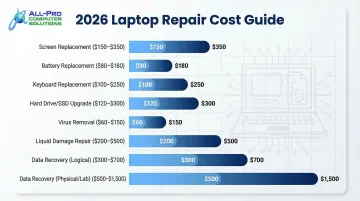
| Repair Type | Typical Cost Range |
|---|---|
| Screen Replacement | $125–$400 |
| Battery Replacement | $50–$200 |
| Keyboard Replacement | $75–$225 |
| Hard Drive / SSD Upgrade | $100–$275 |
| Virus & Malware Removal | $70–$150 |
| Liquid Damage Repair | $100–$300+ |
| Data Recovery (logical) | $100–$300 |
| Data Recovery (physical/lab) | $500–$1,500+ |
Screen Replacement
Cost range: $125–$400 depending on screen size, resolution, and display type
Standard 1080p panels sit on the low end, while 4K, OLED, or touchscreen displays cost considerably more. Always get a quote before assuming it's not worth fixing.
Battery Replacement
Cost range: $50–$200 installed
Standard batteries for common PC models cost less, while proprietary batteries for MacBooks or premium ultrabooks run higher. A battery swap can add years to a laptop that won't hold a charge.
Keyboard Replacement
Cost range: $75–$225
PC laptop keyboards are straightforward swaps. Mac keyboards require far more disassembly time, pushing costs higher. Individual key repairs are sometimes possible but not always cost-effective.
Hard Drive / SSD Replacement or Upgrade
Cost range: $100–$275 including parts and labor
Migrating data from the old drive to the new one adds to the cost but is often worth it. An SSD upgrade on an older machine with a spinning hard drive is often the single highest-value repair a technician can perform.
Virus and Malware Removal
Cost range: $70–$150
A proper removal takes more than running one scan. It involves checking for rootkits, cleaning browser hijackers, reviewing startup programs, and confirming nothing is still active. Shortcuts here mean the problem returns.
Liquid Damage Repair
Cost range: $100–$300+
Damage severity depends more on how long liquid was inside than how much was spilled. If liquid damage occurs, immediately power off and leave the device off — powering it on repeatedly compounds the damage.
Data Recovery
Cost range: $100–$300 for logical recovery (deleted files, corrupted partitions); $500–$1,500+ for physically failed drives requiring lab-level work
A clicking or grinding drive should never be powered on again before a professional sees it. Every time a failing drive spins, damaged read/write heads can scratch the platters, causing permanent data loss.
Key Factors That Affect Laptop Repair Costs
Knowing what drives price variation helps you evaluate quotes accurately — and catch red flags before you hand over your machine.
Mac vs. PC
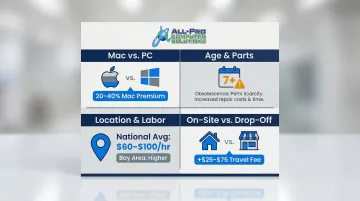
Mac repairs consistently cost more than equivalent PC repairs. Third-party Mac repair specialists provide 20–40% cost savings compared to Apple's official out-of-warranty pricing, meaning direct Apple repairs can cost substantially more.
This premium comes down to Apple's proprietary parts and limited third-party availability. Modern MacBooks have processors, RAM, and flash memory soldered directly to the logic board, with batteries and keyboards glued or riveted into the case — all of which significantly increase labor time and parts costs.
Age and Parts Availability
Older laptops (7+ years) often require sourced used parts or discontinued components, which drives up both cost and turnaround time. Apple officially designates products "Obsolete" when they haven't been distributed for sale for more than 7 years and discontinues all hardware service.
A good technician will tell you when parts costs are approaching the machine's actual resale value.
Labor Rates and Location
National averages: $60–$100 per hour, with California Bay Area rates at the higher end
The U.S. Bureau of Labor Statistics reports that computer repair technicians in the San Francisco-Oakland-Hayward area earn a median hourly wage of $30.30, compared to the national median of $22.53. This translates to billed shop rates of $80–$150/hour in Marin, Sonoma, and Mendocino counties.
On-site or mobile repair adds a travel/call-out fee of $25–$75 on top of standard rates. In-shop drop-off is always the most cost-effective option for portable devices.
Flat Rate vs. Hourly Billing
Some shops charge flat rates per service type; others bill hourly. The right model depends on the job:
- Flat rate works in your favor on complex repairs that take longer than expected
- Hourly rate is better for simple, quick fixes where the work is straightforward
- Always confirm the billing model before leaving your device
When in doubt, ask for an estimate in writing.
Parts Quality
Parts quality directly affects both price and how long the repair holds up. OEM (original manufacturer) parts, quality aftermarket parts, and cheap low-grade components carry very different reliability outcomes — and a shop's parts sourcing affects your long-term cost more than the upfront quote suggests.
Ask your technician what grade of parts they use before approving any repair. APCS uses quality parts across all hardware repairs, which is why their North Bay clients rarely see the same problem twice.
Repair vs. Replace: How to Make the Smart Call
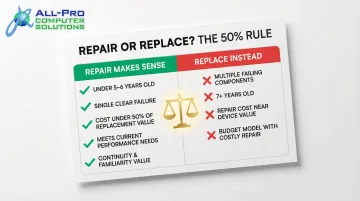
Most technicians apply the 50% rule: if repair costs exceed 50% of what a comparable replacement laptop would cost today, replacing usually makes more financial sense. Some shops apply a stricter 25% threshold for machines over six or seven years old.
Use these criteria to apply that rule to your situation:
Repair makes sense when:
- The laptop is under 5–6 years old
- The failure is a single clear issue (not multiple components degrading)
- Repair cost stays well under the 50% threshold
- The device still meets performance needs after the fix
- Important data, software licenses, or a familiar setup make continuity valuable
Replace when:
- Multiple components have failed or are showing signs of failure
- The laptop is 7+ years old and struggling with current software
- Repair cost approaches or exceeds the device's value
- It's a budget model where a single screen repair costs more than the machine is worth
Before committing to a repair, ask the technician directly: "Are there other components likely to fail soon?" A straightforward answer to that question will tell you everything you need to make the right call.
What Most People Get Wrong About Laptop Repair Costs
Three mistakes drive up repair bills more than any single part or labor cost:
- Parts quality matters more than the quote. Cheaper repairs using low-grade components often fail within months — doubling your total cost when you're back in the shop.
- Skipping the diagnostic fee backfires. Most reputable shops charge $30–$75 and apply it toward the repair if you proceed. Without it, technicians work blind and misdiagnosed repairs follow.
- Waiting too long turns a $150 fix into a $1,500 problem. A hard drive showing early warning signs is a straightforward replacement. A drive that fully fails before you act can require $500–$1,500 in data recovery.
Catching issues early is exactly where a quick assessment pays off. APCS serves Marin, Sonoma, and Mendocino counties — reach them at (707) 400-7100 (Sonoma County) or (415) 900-8928 (Marin County).
Frequently Asked Questions
What are laptop repair service prices in 2026?
Most common laptop repairs fall between $75 and $300. Software fixes sit on the lower end; hardware replacements and data recovery sit higher, sometimes exceeding $1,000 for severe drive failures.
How much does it cost to diagnose a laptop or PC?
Diagnostic fees typically range from $30 to $75. Most reputable shops apply this fee toward the repair cost if you proceed with service, so you pay nothing extra for the diagnosis if you move forward.
How much do computer repair shops or technicians charge per hour?
National average hourly rates run $60–$100 per hour. California Bay Area rates tend to be at the higher end of this range, with additional fees of $25–$75 for on-site visits.
How much does it cost to replace or recover a laptop or PC hard drive?
Standard hard drive or SSD replacement costs $100–$275 including parts and labor. Data recovery runs $100–$300 for logical failures and $500–$1,500+ for physical damage requiring lab-level work.
Is it worth repairing a failing hard drive?
Hard drives themselves can't be repaired — replacement is the standard fix. Data recovery is worth pursuing if the files matter, but powering on a clicking drive reduces recovery odds.
Is a 7-year-old computer worth repairing?
Minor repairs like a battery or keyboard swap can still make sense if the cost stays well under 50% of replacement value. For major failures — motherboard, screen — replacement is usually the smarter call at that age.