iMac power supply repair costs vary considerably depending on your model, the severity of the issue, and who performs the repair. Without understanding what drives these costs, you risk either overspending on unnecessary repairs or replacing a perfectly fixable machine. This guide walks you through how to spot power supply failure symptoms, what repairs typically cost, what drives prices up or down, and how to decide between repair and replacement.
TL;DR
- Typical iMac power supply repair costs range from $150–$400 depending on model, parts, and labor
- Older pre-2012 iMacs are cheaper to repair; newer adhesive-sealed Retina models require more labor
- No power, random shutdowns, or flickering displays usually indicate PSU failure — not a logic board problem
- A professional diagnosis ($50–$100) prevents misdiagnosis and avoids paying for the wrong repair
- If your iMac still runs current macOS, repairing the PSU typically costs 70–80% less than buying a replacement
Signs Your iMac Has a Power Supply Problem
iMac power supply symptoms are often misread as logic board failures, and a correct diagnosis is the first step before spending money on repairs. Understanding the most telling warning signs can save you from pursuing the wrong fix — sometimes a costlier fix.
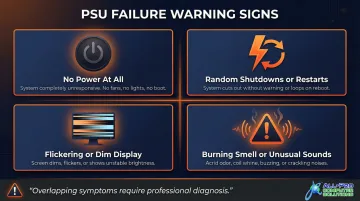
Symptom 1: iMac Won't Power On at All
A completely dead iMac—no chime, no fan spin, no LED activity—is the most direct indicator of power supply failure. That said, logic board issues can produce identical symptoms, making professional diagnosis essential before ordering parts or committing to repair.
Pre-2012 iMac models include small diagnostic LEDs on the logic board (visible through the vent). If LED #1 is unlit when the machine is plugged into a known-good outlet, the power supply or AC source is faulty. If LED #1 lights but LED #2 doesn't illuminate when you press the power button, the issue could be the PSU, logic board, or the cable connecting them.
Symptom 2: Random Shutdowns or Restarts
An iMac powering off spontaneously under load, or restarting without warning, is a classic sign the PSU can no longer deliver stable power. This differs from overheating-related shutdowns, which typically occur after extended use or when running intensive applications. PSU-related shutdowns happen unpredictably, even during light tasks like web browsing.
Symptom 3: Flickering Display or Startup Failures
Dim, flickering, or backlight-only displays—where the image is barely visible—are common PSU-related symptoms, particularly in older iMac models where the display power circuit and PSU are closely linked. If your screen lights up but remains black or shows only a faint image, the power supply may not be delivering adequate voltage to the display.
Symptom 4: Unusual Sounds or Burning Smell
Buzzing, clicking from the PSU area, or a faint burning/electrical smell strongly suggest internal PSU component failure. If you notice these symptoms, power the machine off immediately and disconnect it from the outlet. Continuing to use an iMac with a failing PSU risks further damage and potential safety hazards.
Because several of these symptoms overlap with logic board failures, professional diagnosis matters before you commit to a repair. A qualified technician can run a full diagnostic to confirm which component has actually failed — and spare you the cost of replacing the wrong one.
How Much Does iMac Power Supply Repair Cost?
iMac power supply repair does not have a fixed price. Costs depend on model year, parts availability, and labor rates in your area. Misjudging the cost leads to two common mistakes: delaying a repair that's actually affordable, or replacing a machine that was worth fixing.
Typical Cost Ranges
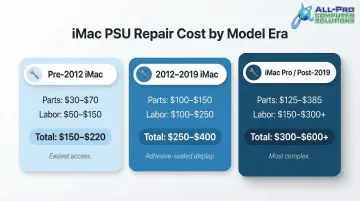
Pre-2012 iMac Models (Screw-Accessible Display):
- Parts: $30–$70 for the PSU unit
- Labor: $50–$150 (30–60 minutes of work)
- Total Estimate: $150–$220
These older models have a separate, replaceable PSU accessible by removing the front glass with suction cups and unscrewing the display. The straightforward design keeps labor costs low.
2012–2019 iMac Models (Adhesive-Sealed Display):
- Parts: $100–$150 for the PSU unit
- Labor: $100–$250 (1–2 hours of work)
- Total Estimate: $250–$400
Retina iMacs introduced adhesive-sealed displays that must be carefully cut and removed using specialized tools. Technicians must then apply fresh adhesive strips during reassembly, increasing both time and risk—screens can crack during removal, adding unplanned costs.
iMac Pro and Post-2019 Models:
- Parts: $125–$385 (iMac Pro PSUs are scarce and proprietary)
- Labor: $150–$300+ (complex disassembly)
- Total Estimate: $300–$600+
Tightly integrated components and Apple silicon design make third-party power supply repair more complex and expensive. Some repair shops may decline these repairs or recommend Apple service.
Diagnostic fees: Most shops charge a separate diagnostic fee, typically $50–$100, before repair begins. Many shops credit this fee toward the total repair cost if you proceed with the work.
That diagnostic fee also buys you something a national mail-in service can't: a local technician who can answer questions in real time. APCS has been repairing Macs across the North Bay Area since 1998, and local turnaround typically beats the wait time of shipping a machine out and back.
Key Factors That Affect iMac Power Supply Repair Cost
Two iMac owners with the same symptoms can end up with very different repair bills based on a handful of key variables.
iMac Model Year and Design
Older iMac models (pre-2012) have a separate, replaceable PSU that is cheaper to source and replace. The front glass is held on by magnets, and the display is secured with screws—technicians can access the PSU in 30–60 minutes.
Newer all-in-one designs (2012 and later) require cutting through foam adhesive to remove the display, then reapplying fresh adhesive during reassembly. This process takes 1–2 hours and introduces the risk of cracking the display, both of which raise costs. Fewer third-party part options for newer models also push prices higher.
Parts Availability and Quality
Not all replacement parts are equal. Here's how the main options compare:
- OEM Apple parts — guaranteed compatibility, higher upfront cost
- Quality third-party parts (like those APCS sources) — reliable performance, typically lower cost than OEM
- Bargain alternatives — lowest upfront price, but prone to early failure and repeat repairs
Low-quality PSU components often fail prematurely, leaving you with a second repair bill and extended downtime. Paying for quality parts the first time is cheaper in the long run.
Labor Complexity and Local Rates
iMac disassembly, particularly removing the adhesive-sealed display on Retina models, is time-intensive. Technicians must heat the adhesive, carefully slice it with a cutting wheel, lift the fragile display without cracking it, and apply precise new adhesive strips during reassembly.
That complexity is directly reflected in labor rates. North Bay Area shops may price differently than national mail-in services, but local repair typically offers turnaround of 1–3 business days rather than a week or more with shipping. For businesses, that difference in downtime has a real cost.
Repair vs. Replace: Is It Worth Fixing Your iMac?
Use this practical decision framework: if the iMac is relatively recent (within 5–7 years), runs current macOS, and the repair cost is under 50% of replacement value, repair almost always makes economic sense.
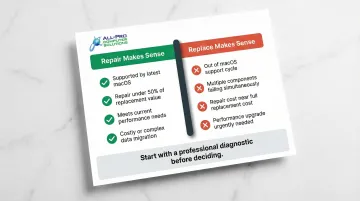
When repair makes sense:
- Your iMac is still supported by the latest macOS version
- Repair cost is less than half the price of a comparable refurbished or new model
- The machine meets your performance needs and has no other failing components
- Downtime for a full data migration and setup would be costly
When replacement makes more sense:
- The machine is out of support for macOS updates (2017 and earlier models are no longer supported by macOS Sonoma)
- Multiple components are failing simultaneously (PSU + logic board + GPU)
- Repair cost approaches or exceeds the cost of a refurbished or newer model
- You need a performance upgrade that the current machine cannot deliver
A quick real-world comparison shows why these thresholds matter. A 2017 iMac sells used for $300–$500, so a $250–$400 PSU repair exceeds 50% of replacement value, and the model no longer receives macOS security updates. A 2019 iMac, by contrast, sells for $400–$800+, making a $250–$350 PSU repair the clear economic choice.
Before committing to a repair, get a professional diagnostic. A $50–$100 evaluation from a technician like those at APCS can reveal whether other components — the logic board, GPU, or cooling system — are also degraded. Discovering a second failing part after paying for a PSU repair is an expensive surprise. A diagnostic tells you exactly what you're dealing with before you spend anything significant.
What Most People Get Wrong About iMac Power Supply Repair Costs
Three mistakes consistently lead iMac owners to overpay — or give up on a machine that still has years of life left.
- Assuming power symptoms point to the logic board. Logic board replacement runs $400–$700+ in parts and labor, or $750–$1,600 through Apple. A PSU fault is far cheaper to fix — but only if it's correctly diagnosed first. Misdiagnosis alone can cost hundreds of dollars and weeks of downtime.
- Going with the lowest-priced repair without asking about parts. Substandard PSU components fail quickly. A $150 repair using a cheap part that dies in six months turns into a $300 problem, plus the frustration of starting over.
- Skipping the repair and buying a new machine. A $150–$300 PSU replacement can extend a mid-cycle iMac's life by 3–5 years — a fraction of the $1,200+ cost of a replacement. A 2019 iMac with a new power supply is still a capable machine worth keeping.
Conclusion
iMac power supply repair costs vary significantly based on model, labor, and part quality—but most repairs fall within a $150–$400 range when caught early and handled by a qualified technician. Understanding the symptoms and cost components helps owners make confident decisions rather than defaulting to full machine replacement out of uncertainty.
That confidence starts with a professional diagnosis. A qualified technician can confirm whether the power supply is actually the issue, source quality parts, and give you a repair that extends your iMac's life for far less than a replacement costs. If you're in the North Bay Area, APCS has handled Mac hardware repairs since 1998 — getting you an honest assessment and a fast turnaround.
Frequently Asked Questions
What are signs of logic board failure?
Logic board failure symptoms include no power with fans spinning briefly, distorted or absent video output, and boot loops to a gray screen. These differ from PSU failure, which typically shows no power activity at all or unstable power delivery. Both require professional diagnosis to confirm.
Is it worth fixing an iMac?
Repair is generally worth it if the machine is within its supported macOS lifecycle and repair cost is under roughly 50% of the machine's current value. A professional diagnostic evaluation is the best first step to determine the true cost and whether additional issues exist.
How long does iMac power supply repair typically take?
Most power supply repairs take 1–3 business days depending on parts availability. Local repair shops are often faster than mail-in services, which require shipping time plus 3–7 days for the repair itself, extending total turnaround to 1–2 weeks.
Can I continue using my iMac if the power supply is failing?
No. Random shutdowns can corrupt data and damage other components. A burning smell is a fire risk—shut down immediately and disconnect from power. Have it professionally diagnosed before attempting further use.
Does Apple cover iMac power supply repair under warranty?
Power supply failures are covered under AppleCare+ or Apple's limited warranty if within the coverage period. Out-of-warranty repairs through Apple tend to be more expensive than qualified local repair shops, and Apple requires an in-person inspection before providing an estimate.
How do I know if my iMac's power supply or something else is causing the problem?
Overlapping symptoms make self-diagnosis unreliable. A professional technician can use diagnostic tools and the iMac's built-in LED indicators to isolate the failing component before any repair begins—preventing you from replacing the wrong part. (Note: LED indicators are available on older iMac models only.)