

This article explains exactly how targeted MacBook Pro repairs improve performance in measurable, day-to-day ways—faster boot times, longer battery sessions, fewer crashes, and uninterrupted workflows. More importantly, it explains why delaying repairs costs far more than the fix itself, both in dollars and lost productivity.
TL;DR
- MacBook Pro performance decline stems from fixable issues, not irreversible aging
- Degraded batteries trigger macOS CPU throttling—battery replacement delivers immediate speed gains
- Thermal repairs eliminate heat-related slowdowns and prevent costly logic board damage
- Storage optimization and software cleanup restore system responsiveness—no hardware upgrades needed
- Delaying repairs turns minor issues into expensive failures and data loss
Why MacBook Pro Performance Declines Over Time
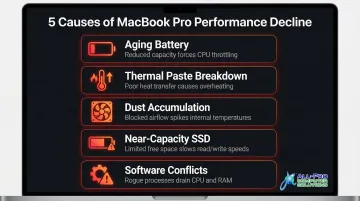
MacBook Pro performance degradation follows predictable patterns driven by daily use, heat exposure, storage fill-up, and component wear. The primary culprits include:
- Aging battery below 80% capacity
- Thermal paste breakdown after 2–6 years of use
- Dust accumulation blocking vents and heatsinks
- Near-capacity SSD forcing macOS to use slower swap memory
- Software conflicts from bloated startup programs and OS updates
macOS itself introduces protective throttling mechanisms—such as CPU speed reduction under thermal stress or when battery capacity falls below safe thresholds—that directly limit performance. These are not bugs; they are deliberate responses to underlying hardware problems that, if left unaddressed, can cause unexpected shutdowns or permanent component damage.
Addressing those hardware problems is precisely what professional MacBook Pro repair does. By restoring the conditions the machine was designed to operate under: adequate cooling, full power delivery, and optimized storage, a proper repair unlocks the full processing capacity and stops macOS from throttling performance in the first place.
Key Performance Benefits of MacBook Pro Repair Services
The performance benefits below are tied to measurable, day-to-day outcomes: faster boot times, longer battery sessions, fewer crashes, and uninterrupted workflows.
Battery Replacement Eliminates CPU Throttling
When a MacBook Pro battery degrades past a certain cycle count or capacity threshold, macOS automatically reduces CPU and GPU clock speeds to prevent unexpected shutdowns. This is a built-in throttling mechanism that silently slows the entire machine, often without clear warning to the user.
Apple designs MacBook Pro batteries to retain up to 80% of their original charge capacity at 1,000 cycles. Below this threshold, macOS displays a "Service Recommended" warning. In severe cases where power delivery is compromised or the battery is disconnected, the CPU can be throttled down to as low as 800MHz—a fraction of its rated speed.
The business case:
Users often misattribute battery-related throttling to software issues or outdated hardware, spending money on unnecessary upgrades when a battery replacement would resolve the slowdown at a fraction of the cost. For business users and home office workers in the North Bay Area, losing 20–40% of processing speed mid-workday has a direct cost in time and output quality. A professional battery replacement restores full processor speed by removing the condition that triggers throttling; the performance gain is immediate and measurable.
KPIs impacted:
- CPU clock speed restored to full rated frequency
- Application load time reduced
- Rendering and compile time decreased
- Battery runtime per charge extended
- Frequency of unexpected shutdowns eliminated
When this advantage matters most:
MacBook Pro models that are 3–5+ years old, users running resource-intensive applications (video editing, design, development), and professionals who cannot afford random shutdowns during critical tasks benefit most from battery replacement.
Thermal Repairs Unlock Sustained Processing Power
Overheating triggers macOS thermal throttling—a safety mechanism that reduces CPU and GPU performance when internal temperatures exceed safe thresholds (often around 100°C). The two primary causes in aging MacBook Pros are dust-clogged vents and dried thermal paste between the CPU/GPU and heatsink.
Professional thermal repair involves:
- Deep internal cleaning to remove dust from fans and heatsinks
- Reapplication of fresh thermal compound between the CPU/GPU and heatsink
- Inspection and testing of fan operation
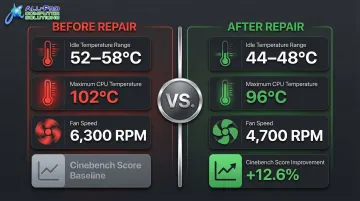
These steps reduce operating temperatures and eliminate the conditions that trigger throttling. Documented testing on a 2018 MacBook Pro showed that repasting dropped idle temperatures from 52–58°C to 44–48°C and improved multi-core Cinebench scores by 12.6%. Another test reduced maximum CPU temperatures from 102°C to 96°C and lowered fan speeds from 6,300 RPM to 4,700 RPM.
Real-world impact:
A MacBook Pro running cooler sustains full performance during extended tasks—video exports, large spreadsheets, or prolonged Zoom calls—without the speed drops users experience on an overheated machine. More critically, overheating left unaddressed accelerates wear on the logic board, SSD, and other components, turning a $120 thermal service into a $600+ logic board repair down the line.
KPIs impacted:
- Sustained CPU/GPU performance under load
- Fan noise levels reduced
- System stability during intensive tasks
- Long-term component lifespan extended
Best suited for:
MacBook Pros that are 2+ years old, users in warmer environments, or anyone regularly running demanding creative or business applications for extended periods see the highest impact.
Storage and Software Optimization Restores System Responsiveness
A near-full or failing SSD forces macOS to use slower swap memory, dramatically increasing load times and causing beachball delays. Additionally, accumulated malware, bloated startup programs, and OS conflicts drain CPU and RAM even when the machine is idle.
Professional storage and software optimization includes:
- Diagnosing SSD health and replacing failing drives
- Clearing system junk and optimizing available storage
- Removing malicious or unauthorized background processes
- Reconfiguring startup items and system settings
APCS technicians—with over 25 years of experience serving North Bay Area homes and businesses—use quality parts in all hardware repairs and follow thorough diagnostic procedures to catch both hardware and software root causes. Storage experts recommend leaving approximately 25% of an SSD's capacity unused to maintain performance consistency and proper over-provisioning.
Why professional diagnosis beats guesswork:
Storage and software issues compound silently—a MacBook Pro can lose responsiveness gradually enough that users don't notice until the device feels unusable. Professional diagnosis identifies the exact bottleneck rather than guessing. For retail, hospitality, or healthcare businesses in Marin and Sonoma County that rely on MacBook Pros for daily operations, even minor responsiveness improvements translate to measurable time savings per workday.
What improves:
- Application launch speed
- System boot time
- Browser and file responsiveness
- Background CPU/RAM usage at idle
- Frequency of system freezes or crashes
Best suited for:
MacBook Pros with SSDs at 80%+ capacity, machines that have never had a software audit, or devices used in business environments where multiple applications run simultaneously.
What Happens When You Delay MacBook Pro Repairs
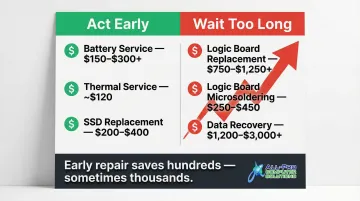
The longer a MacBook Pro issue goes unaddressed, the more expensive it becomes to fix. Minor thermal issues become logic board failures. A degraded battery that causes shutdowns can corrupt data mid-save. A slow SSD that isn't replaced can fail entirely, making data recovery necessary.
Cost comparison:
| Early-Stage Repair | Cost (USD) | Late-Stage Failure | Cost (USD) |
|---|---|---|---|
| Battery service (sourced parts) | $150–$300+ | Logic board replacement | $750–$1,250+ |
| Thermal service | ~$120 | Logic board repair (microsoldering) | $250–$450 |
| SSD replacement | $200–$400 | Data recovery (board-level) | $1,200–$3,000+ |
Operational consequences of delay:
- Persistent slowdowns reduce productive output daily
- Increased crash frequency interrupts work and risks unsaved data
- Overheating shortens the lifespan of expensive internal components
- Forces emergency repair or full device replacement — at far higher cost
The hidden cost of downtime:
For small business owners and home office users in the North Bay Area, an unplanned MacBook Pro outage can mean missed deadlines, delayed client work, or lost revenue. Research shows that unplanned IT downtime costs small and mid-sized businesses between $100,000 and $300,000 per hour. When that's the stakes, a $120 thermal service isn't a maintenance expense — it's protecting your ability to work.
How to Get the Most Out of Your MacBook Pro Repair
Getting the most from a repair means pairing it with consistent upkeep habits:
- Schedule periodic checkups annually or after 300+ battery cycles
- Keep macOS updated to benefit from Apple's own performance and security patches
- Address warning signs promptly — unusual fan noise, unexpected shutdowns, or application slowdowns
Choosing the right service provider also determines how long those results hold. Look for:
- Quality parts in all hardware repairs — cheap components degrade faster and undo the work quickly
- Accurate diagnostics that identify all underlying issues at once
- Clear guidance on what to monitor going forward
For North Bay Area MacBook Pro owners, APCS offers in-person repair at locations in San Rafael and Healdsburg — with the concierge-style service and fast turnaround that local clients have relied on since 1998.
A MacBook Pro that receives regular thermal cleaning, timely battery replacement, and periodic software audits will consistently outperform a neglected device of the same age and spec. Repair works best when it becomes a habit, not a last resort.
Conclusion
Most MacBook Pro slowdowns trace back to fixable hardware and software issues. Professional repair addresses each root cause directly, with measurable impact on speed, stability, and battery life.
The financial case is straightforward: a well-serviced MacBook Pro costs less to operate over time, lasts significantly longer, and keeps up with the demands of work, creative projects, and daily use. For most users, repair is the smarter call before replacement enters the picture. If you're in the North Bay Area, APCS has been helping both home users and businesses get more life out of their Macs since 1998.
Frequently Asked Questions
How long does a MacBook Pro repair take?
Repair time varies by issue. Common services like battery replacement or thermal cleaning are typically completed same-day or within 24–48 hours. Logic board or data recovery repairs may take longer depending on parts availability and diagnosis complexity.
Is it worth repairing a MacBook Pro?
Yes—especially for models less than 6–7 years old. Apple supports service and parts for at least 5 years after a product is last distributed, and a well-maintained MacBook Pro can last several more years at far less than the cost of a new machine ($1,699+).
What are the most common signs my MacBook Pro needs professional repair?
Key warning signs include persistent slowdowns or beachballing, unexpected shutdowns or rapid battery drain, overheating or loud fan noise, frequent crashes, and unusual noises from the drive or fans. If you're experiencing more than one of these, schedule a diagnostic before the problem escalates.
Can a MacBook Pro repair improve battery life?
Yes. Battery replacement directly restores runtime and eliminates CPU throttling caused by a degraded battery, delivering longer battery sessions and noticeably faster system performance. The improvement is immediate.
Will my data be safe during a MacBook Pro repair?
APCS recommends backing up all critical data to an external USB hard drive and a cloud storage provider before any repair. Your data privacy is a core part of how the team handles every service.
What types of MacBook Pro repairs have the biggest impact on performance?
Three repairs consistently deliver the biggest day-to-day gains:
- Battery replacement — removes CPU throttling and restores full processing speed
- Thermal cleaning and paste reapplication — eliminates heat-related slowdowns
- SSD health restoration or software optimization — brings back system responsiveness