
MacBook screen repairs rank among the most common and most expensive laptop repairs, with costs ranging dramatically from under $100 to over $800 depending on your coverage, model, and where you go. Many MacBook owners face sticker shock when they hear the quote, or make hasty decisions that lead to poor-quality repairs using cheap aftermarket parts.
This guide breaks down what you'll realistically pay across different repair scenarios — AppleCare+, Apple Store out-of-pocket, third-party repair shops, and DIY — what drives those costs, and how to make the smartest decision for your situation.
TL;DR
- MacBook screen repairs range from $99 (with AppleCare+) to $800+ (Apple Store without coverage)
- Cost drivers: your MacBook model, extent of damage, warranty status, and repair provider
- Third-party shops typically cost 30–50% less than Apple Store pricing
- Newer M-series and Retina display models cost significantly more than older Intel MacBooks
- Small cracks and failing backlights often escalate into costly full assembly replacements if left unaddressed
How Much Does MacBook Screen Repair Cost?
MacBook screen repair doesn't have a single fixed price. The cost depends on your AppleCare status, your MacBook model, and where you get it repaired. Get this wrong and you either underbudget into a low-quality repair with aftermarket parts, or skip the repair entirely — letting the damage worsen into a far costlier problem.
With AppleCare+
AppleCare+ offers unlimited incidents of accidental damage coverage. A screen repair typically incurs a flat service fee:
- Standard MacBooks: $99 per incident for screen or external enclosure damage
- MacBook Neo: $49 per incident
The $99 fee strictly applies to screen or external enclosure damage. "Other accidental damage," such as liquid spills or internal logic board damage, incurs a higher fee of $299 ($149 for MacBook Neo).
Purchasing AppleCare+ upfront runs approximately $199 for a 3-year plan on an M3 MacBook Air, or $279 for a 14-inch MacBook Pro. If you anticipate needing even one screen repair, the plan pays for itself.
Without AppleCare+ (Apple Store Out-of-Pocket)
Apple doesn't publish flat-rate pricing for out-of-warranty repairs. Apple states they will "inspect your device to determine the final service fee", but their Self Service Repair Store reveals what parts actually cost:
| MacBook Model | Display Part Price | After Return Credit |
|---|---|---|
| MacBook Air (M1, 2020) | $395 | $307 |
| MacBook Air (M2, 2022) | $483 | $395 |
| MacBook Pro 14-inch (2021/2023) | $659 | $571 |
| MacBook Pro 16-inch (2021) | $747 | $659 |
These are parts-only costs. Once Apple adds labor, expect M-series Air repairs in the $450–$650 range, while Pro models easily exceed $700–$1,000+. Additional damage — dents, liquid exposure, or internal issues — pushes costs into even higher tiers.
Third-Party Repair Shops
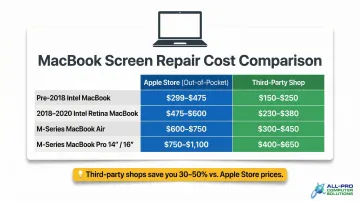
Reputable independent repair shops generally charge 30–50% less than Apple Store pricing:
| Model Category | Typical Cost Range |
|---|---|
| Pre-2018 Intel Models | $179–$299 |
| 2018–2020 Intel Retina | $299–$399 |
| M-Series MacBook Air | $429–$649 |
| M-Series MacBook Pro (14"/16") | $700–$1,100 |
Quality varies widely across independent providers. Before committing, confirm the shop uses OEM or high-grade parts and offers a written warranty — both are reliable indicators you're not trading cost savings for a substandard repair.
Key Factors That Drive MacBook Screen Repair Costs
MacBook screen repair pricing is shaped by a combination of technical and situational factors. Understanding these helps you anticipate costs and avoid surprises.
MacBook Model and Age
Older models (pre-2018) use more widely available display components and cost less to repair. Newer Apple Silicon models (M1, M2, M3) feature bonded Retina or Liquid Retina XDR displays with True Tone and ProMotion technology that are proprietary and far more costly to source.
Price illustration:
- Pre-2018 MacBook Air screen repair: $179–$299 (third-party)
- M2 MacBook Air display parts alone: $483
Modern MacBooks use "bonded" or "laminated" display assemblies, where the LCD panel is permanently fused to the front cover glass. Even a simple crack in the outer glass requires replacing the entire display assembly — including the aluminum lid, webcam, and hinges.
Type and Extent of Screen Damage
Modern MacBook repair paths are largely binary due to bonded display construction:
- Single crack or dead pixels: Requires full display assembly replacement
- Backlight failure: The backlight is integrated into the fused display assembly. Replacing just the backlight bulb is highly complex — most repair shops and Apple mandate a full display assembly replacement
- Fully shattered display: Requires full assembly replacement. Severe impacts can also damage the logic board or chassis
Warranty and AppleCare Status
Standard limited warranty covers manufacturer defects, not accidental damage. AppleCare+ covers accidental damage incidents for a flat $99 fee.
Checking your coverage status before committing to a paid repair can save hundreds of dollars. Visit checkcoverage.apple.com and enter your serial number.
MacBook Air vs. MacBook Pro Display Specs
MacBook Pro models, particularly 14-inch and 16-inch versions with Liquid Retina XDR displays and ProMotion, carry higher screen replacement costs than MacBook Air models.
| Feature | MacBook Air (M2, 2022) | MacBook Pro 14-inch (2023) |
|---|---|---|
| Display Tech | Liquid Retina (IPS) | Liquid Retina XDR (Mini-LED) |
| Brightness | 500 nits | 1000 nits sustained / 1600 nits peak HDR |
| Refresh Rate | 60Hz | ProMotion (up to 120Hz) |
| Apple Part Price | $483 | $659 |
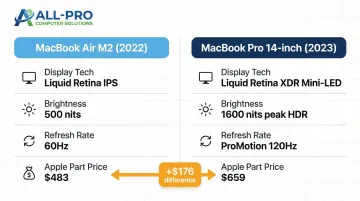
XDR panels cost more because mini-LED backlighting and ProMotion are expensive to manufacture and source. That $176 gap between Air and Pro parts reflects the difference in display hardware — and it shows up directly in your repair bill.
Apple Store, Third-Party Shop, or DIY: Which Makes Sense?
Once you know the cost range, the next decision is where to get the repair done. Each option has trade-offs in price, quality, speed, and risk.
Apple Store (Genius Bar)
The Apple Store is the default choice for many MacBook owners — and for good reason. You get genuine Apple parts, trained technicians, and a 90-day service warranty (or your remaining AppleCare+ term, whichever is longer). Every repair is also logged to your device, which matters for resale value and future service history.
The trade-offs: premium pricing, potential multi-day turnaround, and an appointment requirement.
To get started, check your AppleCare+ status at checkcoverage.apple.com and schedule a Genius Bar appointment at apple.com/retail/geniusbar.
Trusted Third-Party Repair Shops
Reputable independent repair shops offer lower costs — typically 30–50% less than Apple — with often faster turnaround and results that hold up when the shop uses quality parts.
What to look for:
- OEM or high-grade parts (ask directly)
- Written repair warranty
- Transparent upfront pricing
- No surprise diagnostic fees
If you're in Sonoma or Marin County, All Pro Computer Solutions checks every one of those boxes — a family-owned shop serving the North Bay since 1998, with a track record built entirely on word-of-mouth referrals.
DIY Repair
When DIY might make sense:
- Older pre-2018 models where parts are accessible and affordable
- You have prior electronics repair experience
When to absolutely avoid DIY:
- M-series MacBooks with bonded display assemblies
- Devices still under AppleCare+ (DIY voids coverage)
- No prior experience — risk of logic board damage during disassembly can turn a $300 repair into an $800+ catastrophe
iFixit rates the 2021 14-inch MacBook Pro a 5/10 for repairability, noting that pentalobe screws and complex routing hinder the process. DIY display replacements on modern MacBooks also disable True Tone due to software pairing — a known limitation worth factoring in.
Smart Questions to Ask Any Repair Shop
Before handing over your MacBook, ask:
- What is the total cost including parts and labor?
- Are the parts OEM or aftermarket?
- What warranty comes with the repair?
- What is the estimated turnaround time?
- Are there diagnostic fees if I decline the repair?
Is It Worth Repairing Your MacBook Screen?
The core "repair vs. replace" decision framework: compare the repair cost against the current resale/replacement value of your MacBook. Financial and tech experts recommend that if repair costs exceed 50% of the device's current market value, replacement is worth considering.
Repair clearly makes sense when:
- MacBook is 3 years old or newer
- High-performance spec with M-series chip
- Device contains irreplaceable data
- Repair cost is under 50% of current value
Replacement may be smarter when:
- MacBook is 7+ years old
- Prior liquid damage or recurring hardware issues
- No longer receiving macOS updates
- Repair cost exceeds 50% of current market value
Market value reality check (April 2026):
| MacBook Model | Current Resale Value | Estimated Repair Cost | Verdict |
|---|---|---|---|
| MacBook Pro M2 (2022) | $900–$1,100 | $300–$500 | Repair |
| MacBook Air M1 (2020) | $334–$366 | $400–$500+ | Replace |
| MacBook Air Intel (2019) | $215–$263 | $300–$400+ | Replace |
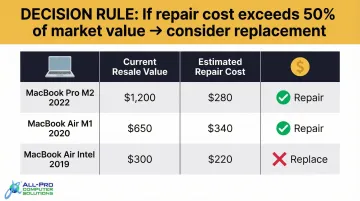
If your model isn't in the table, run the math yourself: get a repair quote, then check current resale prices on eBay or Swappa. That number tells you everything. One practical note regardless of model: a spreading crack or failing backlight won't hold at its current repair price. What costs $300 to fix today can turn into a $700+ full assembly replacement within weeks.
Common Mistakes That Drive Up MacBook Screen Repair Costs
Three avoidable choices consistently push repair bills higher than they need to be:
Choosing on price alone. A suspiciously low quote often signals low-grade aftermarket display components — the kind that develop color shifts or fail within months. Apple restricts the sale of new OEM LCD panels to independent shops, so third-party shops source either pulled (used) OEM assemblies or aftermarket knockoffs. Before agreeing to any repair, ask specifically whether the replacement panel is OEM or aftermarket.
Waiting on minor damage. A small corner crack that spreads to the panel center, or a backlight left flickering for weeks, usually ends up requiring a full display assembly replacement. Early intervention on older models typically runs $179–$299; a full assembly replacement on M-series models can reach $400–$650+.
Skipping the coverage check. Homeowner's or renter's insurance and credit card purchase protection often cover accidental damage within the first 90–120 days of purchase. Checking these before paying out-of-pocket can save you hundreds.
Frequently Asked Questions
How much does it cost to replace a MacBook Air screen?
For older Intel models (pre-2020), third-party shops typically charge $179–$399. For newer M-series models (M1/M2/M3), costs range from $429–$649 at independent shops, while Apple's parts-only cost starts at $395–$483.
How much does it cost to repair a MacBook Pro display?
MacBook Pro screen replacements are pricier because of Liquid Retina XDR technology. Expect to pay $700–$1,100 at third-party shops, with Apple's baseline parts-only costs sitting at $659 for 14-inch models and $747 for 16-inch models.
How much does it cost to repair a Mac backlight?
Backlight repair is rarely offered as a standalone service — modern MacBook Retina displays are laminated and fused, making isolated backlight work impractical. Most shops and Apple require a full display assembly replacement, which runs $300–$650+ depending on model.
Is it worth repairing a MacBook screen?
Repair is generally worth it for MacBooks under 4–5 years old in good overall condition. Compare repair cost against current device value — if repair exceeds 50% of market value, replacement is often smarter.
Should I repair my Mac or buy a new one?
If your MacBook is relatively new, runs well, and the repair falls well under 50% of replacement cost, fixing it makes sense. If the device is aging, has recurring problems, or no longer receives macOS updates, a new machine is the smarter investment.
Can Apple repair or replace a MacBook screen?
Yes, Apple can repair or replace MacBook screens through the Genius Bar or Apple Authorized Service Providers. Coverage and out-of-pocket cost depend on whether you have AppleCare+ ($99 deductible) or are paying out-of-warranty ($450–$1,000+).